
Ory is an open-source identity and access management (IAM) platform providing modular, cloud-native components for authentication and authorization in distributed systems. When paired with CockroachDB as its persistent data store, you get a fully scalable, resilient IAM foundation capable of operating across regions without complex data migrations or single points of failure.
This tutorial walks through a complete end-to-end deployment of all three Ory services (Hydra, Kratos, and Keto) on Kubernetes (AWS EKS), backed by a secure CockroachDB cluster, including SQL verification of every stored IAM record.
Key Components
Ory’s platform is composed of three independent, stateless services, each handling a distinct layer of the IAM stack:
| Service | Responsibility |
|---|---|
| Ory Hydra | OAuth2 authorization server and OpenID Connect provider |
| Ory Kratos | Identity management: users, credentials, sessions, verification |
| Ory Keto | Relationship-based access control (ReBAC) via relation tuples |
The following diagram shows the relationship between Ory Hydra, Kratos and Keto:
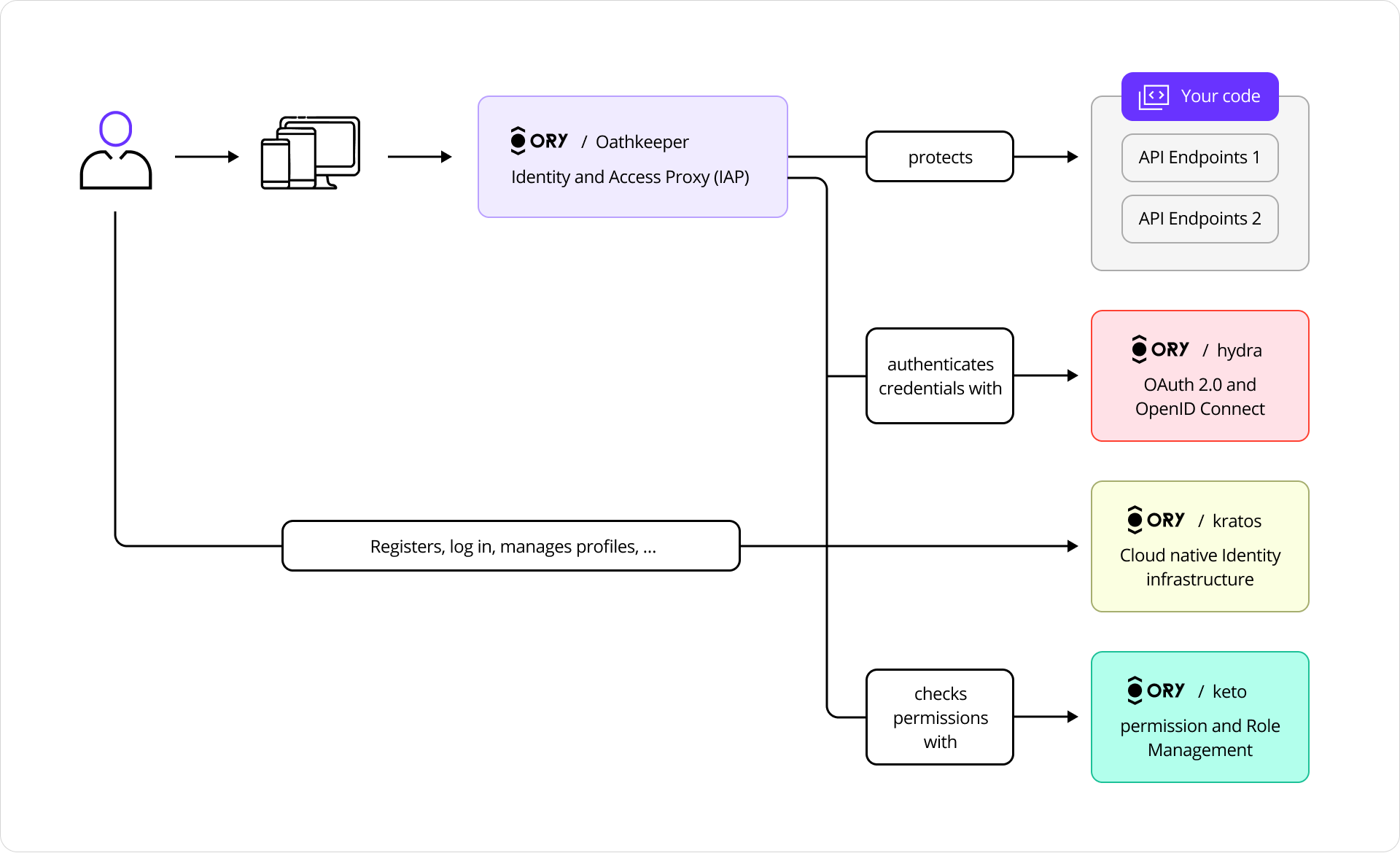
Ory Services
Because each service is stateless, all persistent state lives in CockroachDB. This means horizontal scaling, rolling updates, and multi-region deployments are straightforward, with no sticky sessions and no distributed caches to coordinate.
Ory Hydra
Ory Hydra is a server implementation of the OAuth 2.0 authorization framework and OpenID Connect Core 1.0. It tracks clients, consent requests, and tokens with strong consistency to prevent replay attacks and duplicate authorizations.
The OAuth 2.0 framework enables third-party applications to obtain limited access to HTTP services on behalf of resource owners or independently.
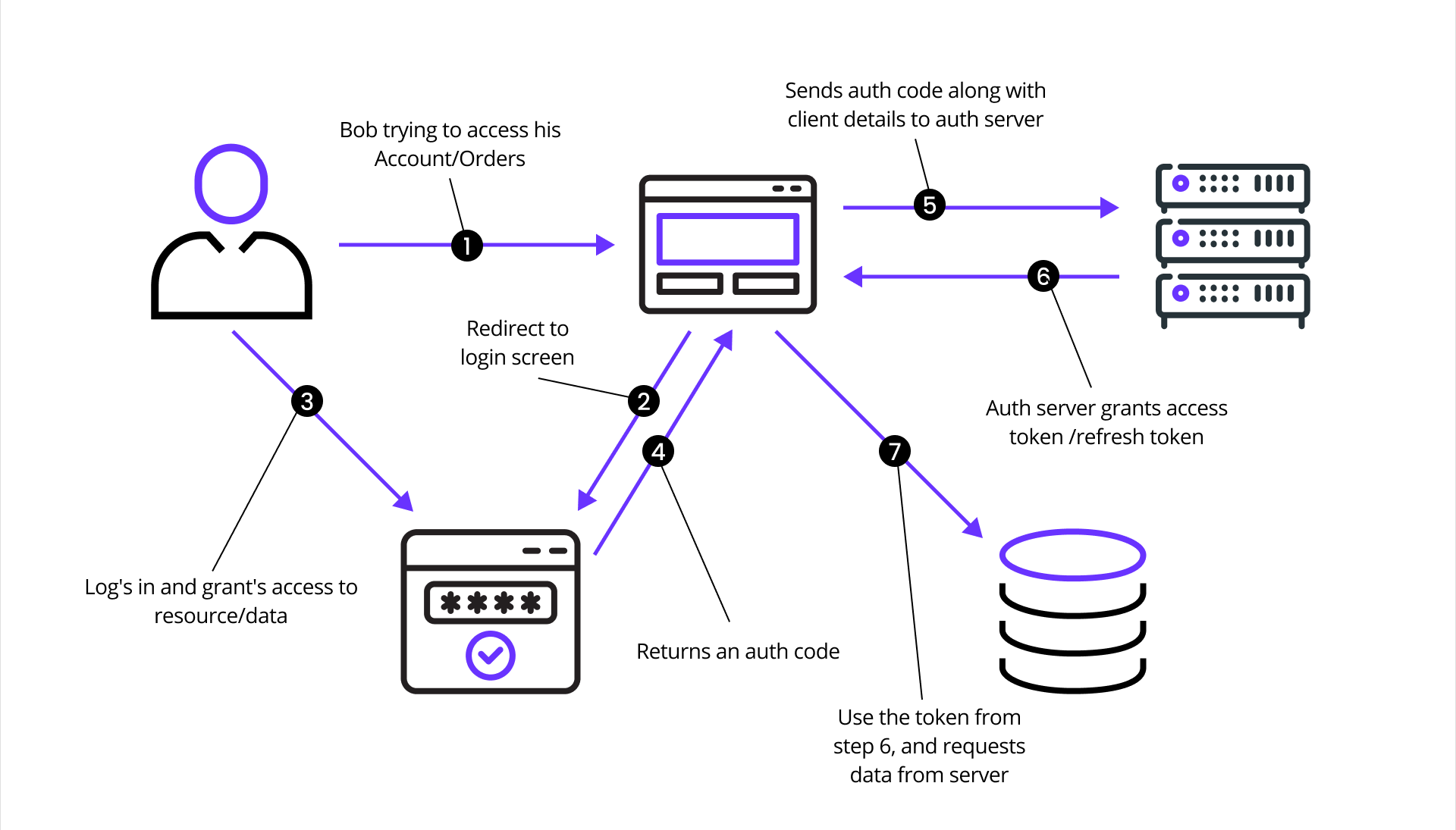
OAuth 2.0 flow diagram
This sequence diagram illustrates the OAuth 2.0 authorization flow as a series of requests and responses, using Ory Hydra as the authorization server:
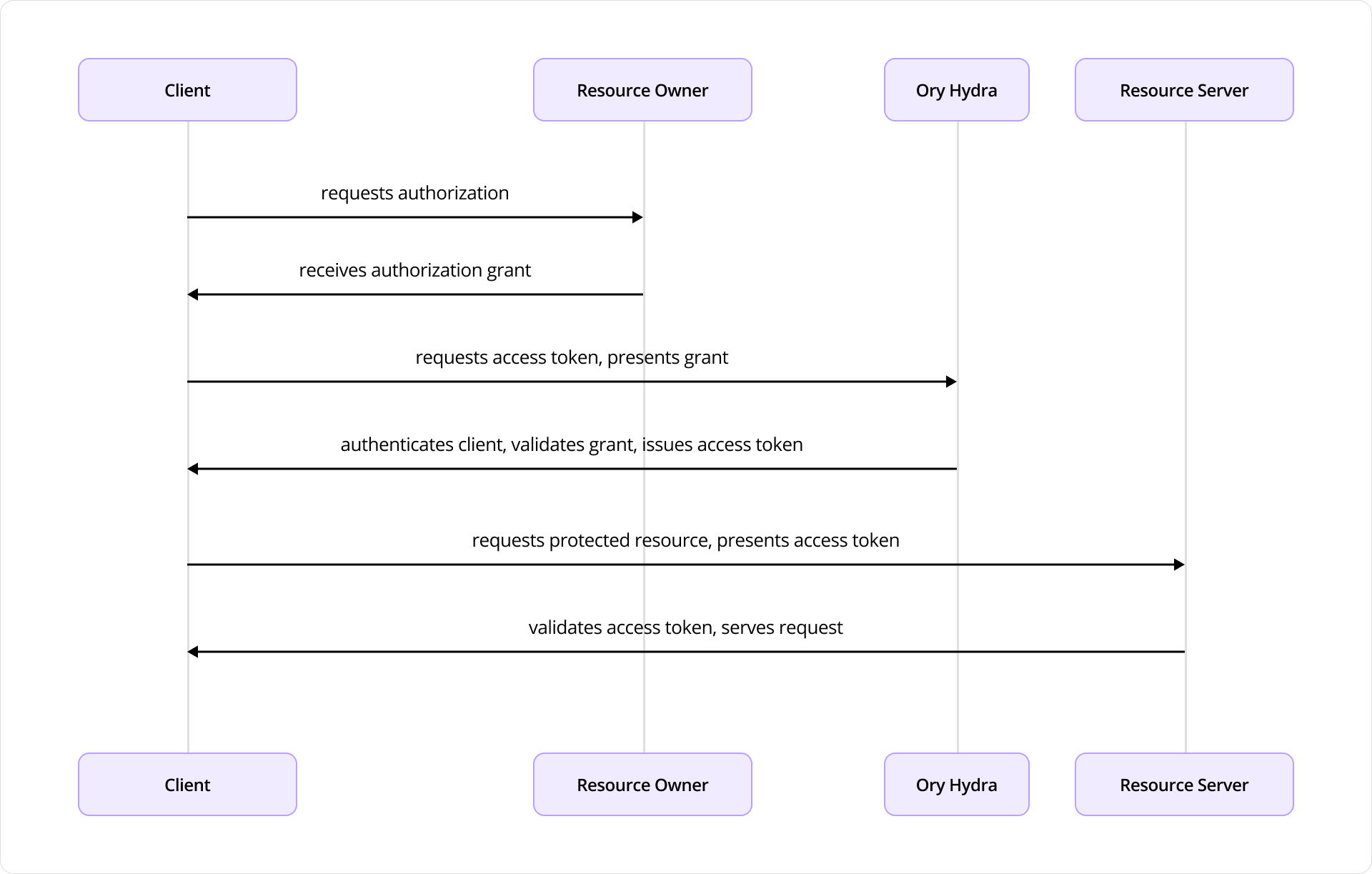
Ory Hydra authorization flow
The diagram depicts the interactions between four key components:
- Client: an application seeking access to protected resources
- Resource Owner: the end user
- Ory Hydra: the authorization server
- Resource Server: the API or service hosting protected resources
The flow begins when the Client requests authorization from the Resource Owner, typically via redirect to a login or consent screen provided by Ory Hydra. Upon approval, the Resource Owner provides an authorization grant to the Client.
The Client uses this grant to request an access token from Hydra, authenticating itself with Client ID and secret. Hydra validates both the grant and credentials, then issues an access token.
With the access token, the Client requests protected resources from the Resource Server, presenting the token as proof of authorization. The Resource Server validates the token through introspection or signature verification (if a JSON Web Token) and serves the requested resource.
CockroachDB stores all OAuth2 clients, authorization codes, access tokens, and consent sessions durably and with linearizable consistency.
Ory Kratos
Ory Kratos stores user identity records, recovery flows, sessions, and login attempts in transactional tables. Each identity associates with one or more credentials stored in the identity_credentials table, defining authentication mechanisms such as passwords, social login, or other methods.
Kratos enables users to sign up and manage profiles without administrative intervention, implementing:
- Registration and Login / Logout
- User Settings
- Account Recovery
- Address Verification
- 2FA / MFA
- User-Facing Error Handling
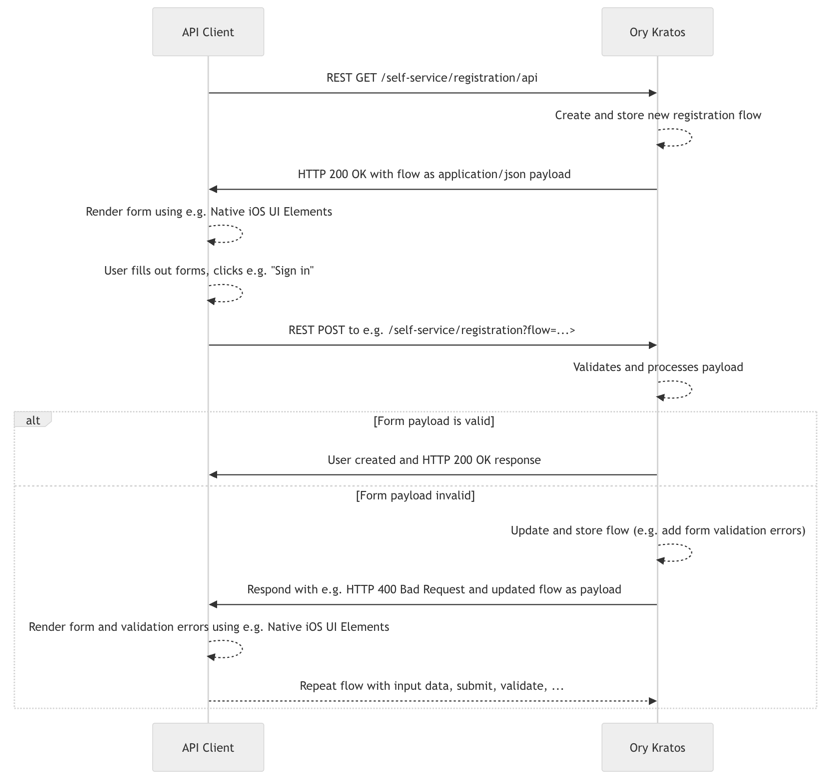
Ory Kratos registration flow
Each user identity record is stored in transactional CockroachDB tables:
identities: core identity record with schema and stateidentity_credentials: passwords, social logins, and other authentication methodssessions: active session tokens and expiry dataverification_tokens: email/phone verification flows
Ory Keto
Ory Keto provides scalable, relationship-based access control (ReBAC) through relation tuples, using the same model as Google Zanzibar.
Authorization is checked by evaluating whether a relation tuple exists (directly or through recursive expansion) permitting a subject to perform a relation on an object in a namespace. This data model enables high scalability and flexibility for complex access patterns including group membership, role inheritance, and hierarchical access rights.
Permission checks are answered based on:
- Data in CockroachDB: e.g., “user Bob is the owner of document X”
- Permission rules: e.g., “all owners of a document can view it”
When asking “Is user Bob allowed to view document X?”, the system checks Bob’s view permission and verifies Bob’s ownership. The permission model tells Ory Keto what to check.
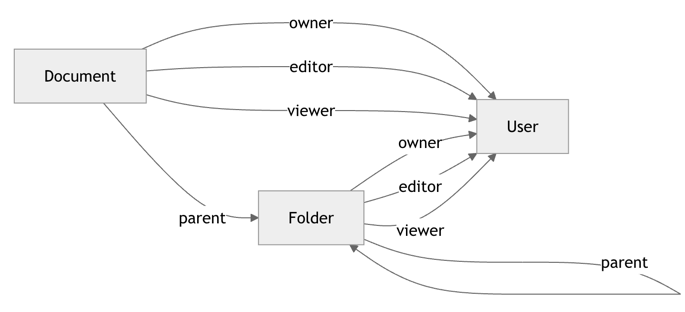
Ory Keto permission graph
Why CockroachDB?
Each Ory service requires a reliable, consistent database. CockroachDB’s properties map directly to IAM requirements:
- Serializable isolation: prevents double-spend on tokens and duplicate consent grants
- Multi-region active-active: Ory services in any region can write to the same logical cluster
- Horizontal scalability: token tables grow with your user base without re-sharding
- Survivability: automatic Raft-based replication tolerates node and zone failures transparently
Integration Architecture
The integration combines three Ory components, each operating as a stateless service backed by CockroachDB:
| Service | Stores |
|---|---|
| Ory Hydra | OAuth2 clients, consent sessions, tokens |
| Ory Kratos | Identities, credentials, sessions, verification tokens |
| Ory Keto | Relation tuples for RBAC/ABAC permissions |

Single-region Ory + CockroachDB architecture
This diagram illustrates a single cloud region deployment across three Availability Zones: us-east-1a, us-east-1b, and us-east-1c.
- Ory VPC: Amazon EKS cluster with worker nodes distributed across zones, running Hydra, Kratos, and Keto pods with ingress and service routing
- CRDB VPC: CockroachDB nodes across zones forming a single logical cluster using Raft consensus for data replication
- Network Load Balancer: routes traffic across healthy nodes with automatic failover
Prerequisites
- AWS account with EKS and EC2 permissions
- Configured AWS CLI profile
- Installed: Terraform, kubectl, eksctl, and Helm (v3+)
- Basic Kubernetes knowledge
- (Optional) Domain and DNS configuration for public exposure
- Estimated setup time: 45–60 minutes
Step 1: Provision a CockroachDB Cluster
Choose one deployment method:
- Local: multi-node self-hosted cluster using the CockroachDB binary
- AWS EC2: self-hosted cluster on Amazon EC2 with AWS managed load-balancing
- CockroachDB Cloud: fully-managed service by Cockroach Labs with trial credits
Important: Create a secure cluster; user creation requires it.
Step 2: Create Databases for Ory Services
Separate databases isolate data across Ory components:
- Hydra: manages OAuth2 clients, consent sessions, access/refresh tokens
- Kratos: handles identity, credentials, sessions, verification tokens
- Keto: stores relation tuples (RBAC/ABAC data) for permissions
Connect to your CockroachDB SQL client:
cockroach sql --certs-dir={certs-dir} --host={crdb-fqdn}:26257
Create databases:
CREATE DATABASE hydra;
CREATE DATABASE kratos;
CREATE DATABASE keto;
Create the shared user and grant privileges:
CREATE USER ory WITH PASSWORD 'securepass';
GRANT ALL ON DATABASE hydra TO ory;
GRANT ALL ON DATABASE kratos TO ory;
GRANT ALL ON DATABASE keto TO ory;
Step 3: Provision a Kubernetes Cluster
Create the EKS cluster:
eksctl create cluster \
  --region us-east-1 \
  --name ory \
  --nodegroup-name standard-workers \
  --managed=false \
  --node-type m5.xlarge \
  --nodes 3 \
  --nodes-min 1 \
  --nodes-max 4 \
  --node-ami auto \
  --node-ami-family AmazonLinux2023
This creates three EKS instances (m5.xlarge: 4 vCPUs, 16 GB memory) across multiple AZs. Provisioning takes 10–15 minutes.
Add the Ory Helm chart repository:
helm repo add ory https://k8s.ory.sh/helm/charts
helm repo update
Step 4: Deploy Ory Services
Deploy Ory Hydra
Create hydra_values.yaml (replace {crdb-fqdn}):
image:
  repository: oryd/hydra
  tag: latest
  pullPolicy: IfNotPresent
service:
  public:
    enabled: true
    type: LoadBalancer
    port: 4444
    name: hydra-http-public
  admin:
    enabled: true
    type: LoadBalancer
    port: 4445
    name: hydra-http-admin
maester:
  enabled: false
hydra:
  dev: true
  automigration:
    enabled: true
  config:
    serve:
      public:
        port: 4444
      admin:
        port: 4445
    dsn: "cockroach://ory:securepass@{crdb-fqdn}:26257/hydra?sslmode=disable"
Install and verify:
helm upgrade --install ory-hydra ory/hydra --namespace ory -f hydra_values.yaml
kubectl get pods     # Hydra pod: 1/1 Running, automigrate: Completed
kubectl get svc
Note: Do not use the
--waitflag.
Export endpoint URLs:
hydra_admin_hostname=$(kubectl get svc --namespace ory ory-hydra-admin \
  --template "")
hydra_public_hostname=$(kubectl get svc --namespace ory ory-hydra-public \
  --template "")
export HYDRA_ADMIN_URL=http://$hydra_admin_hostname:4445
export HYDRA_PUBLIC_URL=http://$hydra_public_hostname:4444
Deploy Ory Kratos
Create kratos_values.yaml (replace {crdb-fqdn}):
image:
  repository: oryd/kratos
  tag: latest
  pullPolicy: IfNotPresent
service:
  admin:
    enabled: true
    type: LoadBalancer
    port: 4433
    name: kratos-http-admin
  public:
    enabled: true
    type: LoadBalancer
    port: 4434
    name: kratos-http-public
kratos:
  development: true
  automigration:
    enabled: true
  config:
    serve:
      admin:
        port: 4433
      public:
        port: 4434
    dsn: "cockroach://ory:securepass@{crdb-fqdn}:26257/kratos?sslmode=disable"
    selfservice:
      default_browser_return_url: "http://127.0.0.1/home"
    identity:
      default_schema_id: default
      schemas:
        - id: default
          url: https://cockroachdb-integration-guides.s3.us-east-1.amazonaws.com/ory/kratos-schema.json
courier:
  enabled: false
Install and verify:
helm upgrade --install ory-kratos ory/kratos --namespace ory -f kratos_values.yaml
kubectl get pods
kubectl get svc
Export endpoint URLs:
kratos_admin_hostname=$(kubectl get svc --namespace ory ory-kratos-admin \
  --template "")
kratos_public_hostname=$(kubectl get svc --namespace ory ory-kratos-public \
  --template "")
export KRATOS_ADMIN_URL=http://$kratos_admin_hostname:4433
export KRATOS_PUBLIC_URL=http://$kratos_public_hostname:4434
Deploy Ory Keto
Create keto_values.yaml (replace {crdb-fqdn}):
image:
  repository: oryd/keto
  tag: latest
  pullPolicy: IfNotPresent
service:
  read:
    enabled: true
    type: LoadBalancer
    name: ory-keto-read
    port: 4466
    appProtocol: http
    headless:
      enabled: false
  write:
    enabled: true
    type: LoadBalancer
    name: ory-keto-write
    port: 4467
    appProtocol: http
    headless:
      enabled: false
keto:
  automigration:
    enabled: true
  config:
    serve:
      read:
        port: 4466
      write:
        port: 4467
    namespaces:
      - id: 0
        name: default_namespace
      - id: 1
        name: documents
      - id: 2
        name: users
    dsn: "cockroach://ory:securepass@{crdb-fqdn}:26257/keto?sslmode=disable"
Install and verify:
helm upgrade --install ory-keto ory/keto --namespace ory -f keto_values.yaml
kubectl get pods
kubectl get svc
Export endpoint URLs:
keto_read_hostname=$(kubectl get svc --namespace ory ory-keto-read \
  --template "")
keto_write_hostname=$(kubectl get svc --namespace ory ory-keto-write \
  --template "")
export KETO_WRITE_REMOTE=http://$keto_write_hostname:4467
export KETO_READ_REMOTE=http://$keto_read_hostname:4466
Step 5: Test the Integration
Test Ory Hydra
Create an OAuth2 client:
hydra create oauth2-client \
  --endpoint $HYDRA_ADMIN_URL \
  --format json \
  --grant-type client_credentials
The response includes a client_id and client_secret. Generate an access token:
hydra perform client-credentials \
  --endpoint $HYDRA_PUBLIC_URL \
  --client-id {client_id} \
  --client-secret {client_secret}
Introspect the token:
hydra introspect token \
  --format json-pretty \
  --endpoint $HYDRA_ADMIN_URL {access_token}
Expected response includes "active": true. Verify in CockroachDB:
SELECT id, client_secret, scope, token_endpoint_auth_method, created_at
FROM public.hydra_client;

SELECT signature, client_id, subject, active, expires_at
FROM public.hydra_oauth2_access;
Test Ory Kratos
Initialize the registration API flow and create a user:
flowId=$(curl -s -X GET -H "Accept: application/json" \
  $KRATOS_PUBLIC_URL/self-service/registration/api | jq -r '.id')

curl -s -X POST \
  -H "Accept: application/json" -H "Content-Type: application/json" \
  "$KRATOS_PUBLIC_URL/self-service/registration?flow=$flowId" \
  -d '{
    "method": "password",
    "password": "HelloCockro@ch123",
    "traits": {
      "email": "max@roach.com",
      "name": { "first": "Max", "last": "Roach" }
    }
  }'
Login and retrieve a session token:
flowId=$(curl -s -X GET -H "Accept: application/json" \
  $KRATOS_PUBLIC_URL/self-service/login/api | jq -r '.id')

curl -s -X POST \
  -H "Accept: application/json" -H "Content-Type: application/json" \
  "$KRATOS_PUBLIC_URL/self-service/login?flow=$flowId" \
  -d '{"identifier": "max@roach.com", "password": "HelloCockro@ch123", "method": "password"}'
Check the active session:
curl -s -X GET \
  -H "Accept: application/json" \
  -H "Authorization: Bearer {session_token}" \
  $KRATOS_PUBLIC_URL/sessions/whoami
Logout:
curl -s -X DELETE \
  -H "Accept: application/json" -H "Content-Type: application/json" \
  $KRATOS_PUBLIC_URL/self-service/logout/api \
  -d '{"session_token": "{session_token}"}'
Verify identity in CockroachDB:
SELECT i.id, i.schema_id, i.traits, i.created_at, ict.name AS identity_type
FROM public.identities i
JOIN public.identity_credentials ic ON i.id = ic.identity_id
JOIN public.identity_credential_types ict ON ic.identity_credential_type_id = ict.id;
Test Ory Keto
Create a relation tuple granting Alice viewer access to a document:
echo '{"namespace":"documents","object":"doc-123","relation":"viewer","subject_id":"user:alice"}' \
  | keto relation-tuple create /dev/stdin --insecure-disable-transport-security
Or via REST:
curl -i -X PUT "$KETO_WRITE_REMOTE/admin/relation-tuples" \
  -H "Content-Type: application/json" \
  -d '{"namespace":"documents","object":"doc-123","relation":"viewer","subject_id":"user:alice"}'
Expand access tree:
keto expand viewer documents photos --insecure-disable-transport-security
Check Alice’s permissions:
keto check "user:alice" viewer documents doc-123 \
  --insecure-disable-transport-security
# Expected: allowed
Verify relation tuples in CockroachDB:
SELECT
  t.namespace,
  (SELECT m.string_representation FROM public.keto_uuid_mappings m WHERE m.id = t.object) AS object,
  t.relation,
  (SELECT m.string_representation FROM public.keto_uuid_mappings m WHERE m.id = t.subject_id) AS subject,
  t.commit_time
FROM public.keto_relation_tuples t;
Next Steps
With all three Ory services verified against CockroachDB, you now have a complete IAM backbone ready for production. From here you can:
- Add multi-region CockroachDB nodes for geo-distributed deployments
- Configure Ory’s email courier for verification flows
- Integrate Hydra’s OIDC provider with your application’s authentication layer
- Define fine-grained Keto namespaces and permission models