Large Language Models (LLMs) are transforming how we build intelligent applications, but they carry a fundamental limitation: their knowledge is frozen at training time. Ask a model about your internal documentation, your product catalogue, or last week’s incident report and it will either refuse or hallucinate a plausible-sounding answer.
Retrieval-Augmented Generation (RAG) solves this by grounding every LLM response in your own, up-to-date, domain-specific data. Rather than relying solely on pre-trained knowledge, a RAG system retrieves the most relevant documents from a private knowledge base, injects them as context into the prompt, and only then asks the LLM to generate an answer — precise, trustworthy, and anchored in verified data.
But RAG is not a single technique. In the past two years the field has evolved rapidly from simple vector lookups to sophisticated agent-driven pipelines. This article covers:
- The state of the art — Naive RAG, Graph RAG, and Agentic RAG: how they work, when to use them, and where they fall short.
- Why CockroachDB is an ideal foundation for any of these paradigms.
- A complete, working tutorial implementing a RAG pipeline on CockroachDB using both Google Cloud (Vertex AI) and AWS (Bedrock).
The State of the Art of RAG
RAG has evolved through three distinct generations, each addressing the limitations of the last. Naive RAG established the foundational retrieve-then-generate pattern — simple, fast, and effective for straightforward lookups, but brittle when queries require connecting facts across multiple documents. Graph RAG replaced flat vector chunks with a structured knowledge graph, enabling global sensemaking across large corpora at the cost of higher latency and indexing expense. Agentic RAG pushed further still, embedding autonomous agents that plan, retrieve iteratively, invoke external tools, and self-correct — trading predictability for the ability to tackle genuinely open-ended, multi-step reasoning tasks.
Choosing between them is not a matter of “newer is better” — it is a question of matching the paradigm to the query complexity, latency budget, and cost envelope of your specific use case. The sections below break down each approach so you can make that call with confidence.
Naive RAG
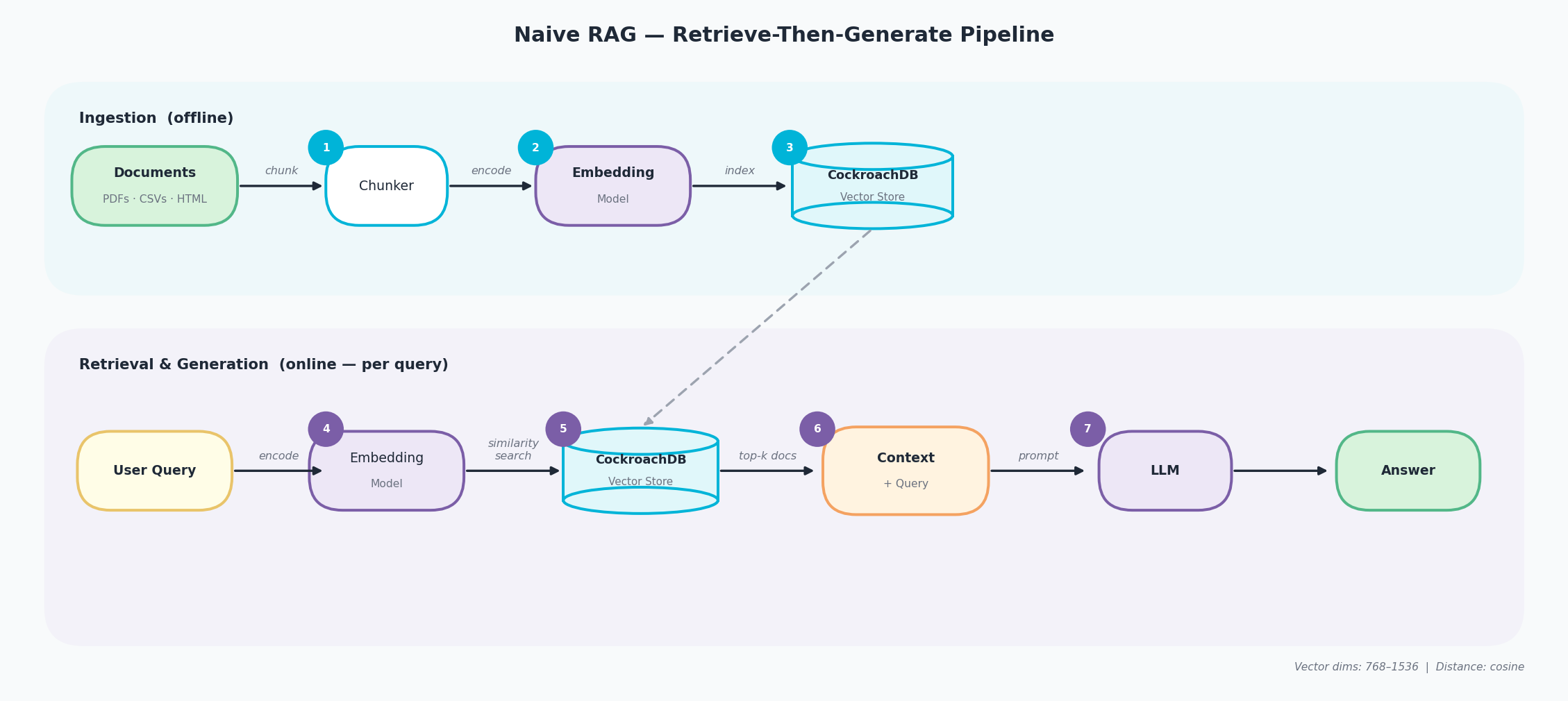
Naive RAG is the foundational retrieve-then-generate paradigm. It runs in two distinct phases — an offline ingestion pipeline and an online retrieval-and-generation pipeline — connected through a shared vector store.
Ingestion (offline)
- Chunk — raw documents (PDFs, CSVs, HTML) are split into fixed-size overlapping text segments by a chunker.
- Encode — each chunk is converted into a high-dimensional vector by an embedding model that captures its semantic meaning.
- Index — the resulting vectors are stored and indexed in the CockroachDB Vector Store, ready for similarity search.
Retrieval & Generation (online — per query)
- Encode query — the user’s question is passed through the same embedding model to produce a query vector.
- Similarity search — CockroachDB compares the query vector against all indexed chunk vectors using cosine distance and returns the top-k closest matches.
- Assemble context — the retrieved chunks are combined with the original query into a single context block.
- Generate — the LLM receives context + query as a prompt and produces a grounded answer.
-
Strengths: minimal complexity, fast to deploy, low latency (< 2 s), low cost. Proven effective for straightforward factual lookup. GPT-4 accuracy on medical MCQs improved from 73% to 80% with basic RAG alone.
-
Weaknesses: struggles with multi-hop reasoning, cannot synthesize across many documents, susceptible to hallucination from noisy or contradictory context chunks, no awareness of relationships between entities.
-
Use it when: you are building a prototype, queries are simple (single-concept lookups), cost and latency are primary constraints, or the document corpus is small and well-structured.
-
Avoid it when: queries require connecting information across multiple sources, multi-step reasoning is needed, or the accuracy bar is high for complex, open-ended questions.
Graph RAG
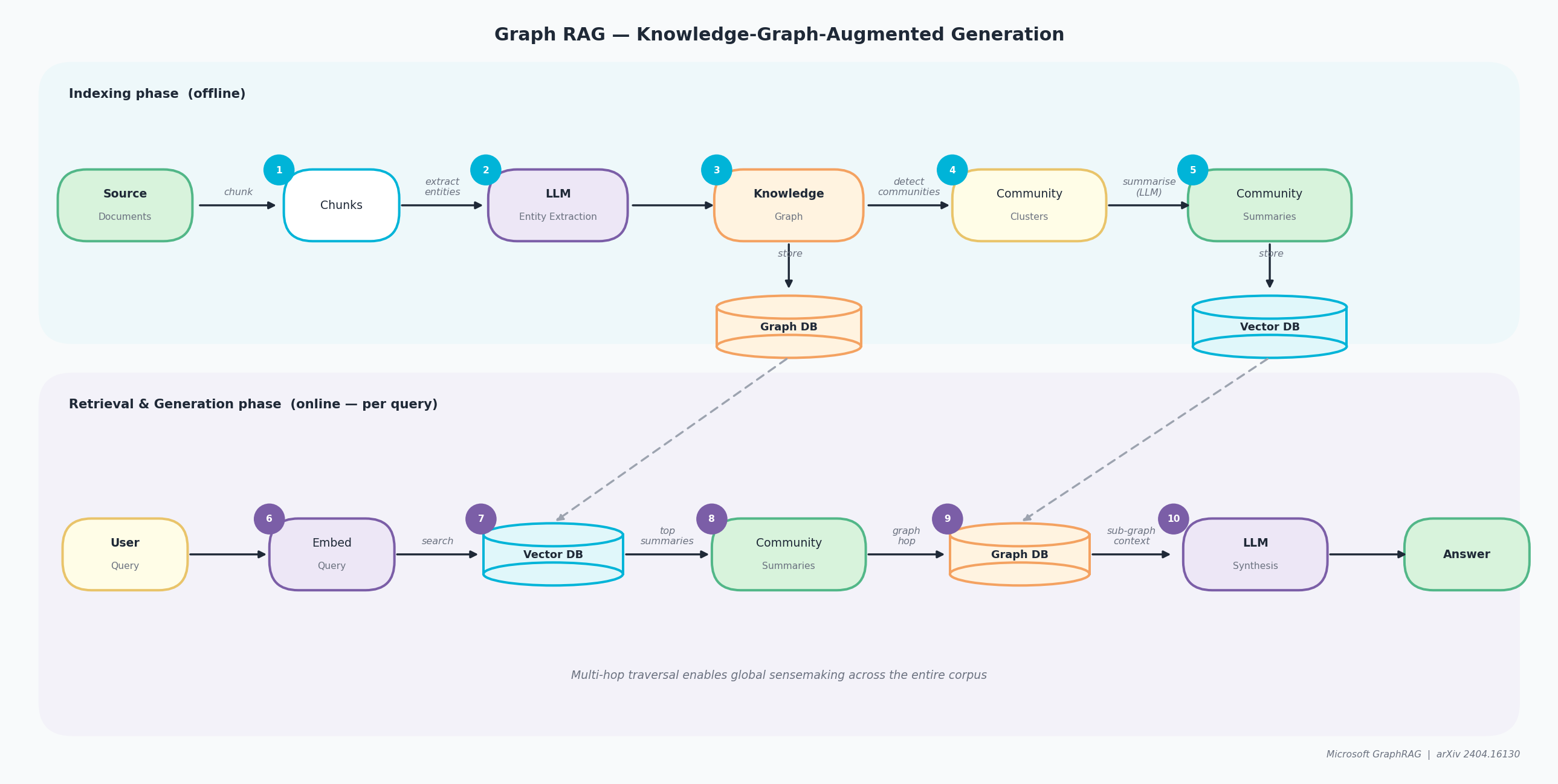
Graph RAG, pioneered by Microsoft Research in their April 2024 paper “From Local to Global: A Graph RAG Approach to Query-Focused Summarization”, replaces flat vector chunks with a structured knowledge graph and hierarchical community summaries.
Indexing phase (offline)
- Chunk — source documents are split into text segments, just as in Naive RAG.
- Entity extraction — an LLM reads each chunk and identifies named entities (people, places, concepts) and the relationships between them.
- Knowledge Graph — extracted entities and relationships are assembled into a graph stored in a dedicated Graph DB.
- Community clustering — a community detection algorithm groups closely related entities into clusters.
- Community summaries — the LLM pre-generates a natural-language summary for each cluster; summaries are stored in both the Graph DB and a Vector DB for fast lookup.
Retrieval & Generation phase (online — per query)
- Embed query — the user query is converted into a vector.
- Vector search — the Vector DB is searched to find the most semantically relevant community summaries.
- Graph hop — for each matched community, the Graph DB is traversed to retrieve supporting entity relationships and fine-grained evidence.
- LLM synthesis — all retrieved summaries and graph context are passed to the LLM to compose a comprehensive answer.
- Answer — the final response is grounded in both community-level and entity-level evidence from across the entire corpus.
-
Strengths: excels at global sensemaking and synthesis across large corpora (1M+ tokens). Microsoft testing showed 72–83% comprehensiveness vs. baseline RAG. Multi-hop reasoning and relationship tracing are first-class capabilities.
-
Weaknesses: high latency (20–24 s average), high indexing cost ($20–500 per corpus), computationally expensive to rebuild when source data changes frequently.
-
Use it when: comprehensiveness matters more than speed, the corpus has rich interconnected relationships (legal, medical, research literature), or enterprise knowledge discovery across many documents is the goal.
-
Avoid it when: real-time responses are required, the budget is tight, the corpus is small, or source data changes frequently.
Agentic RAG
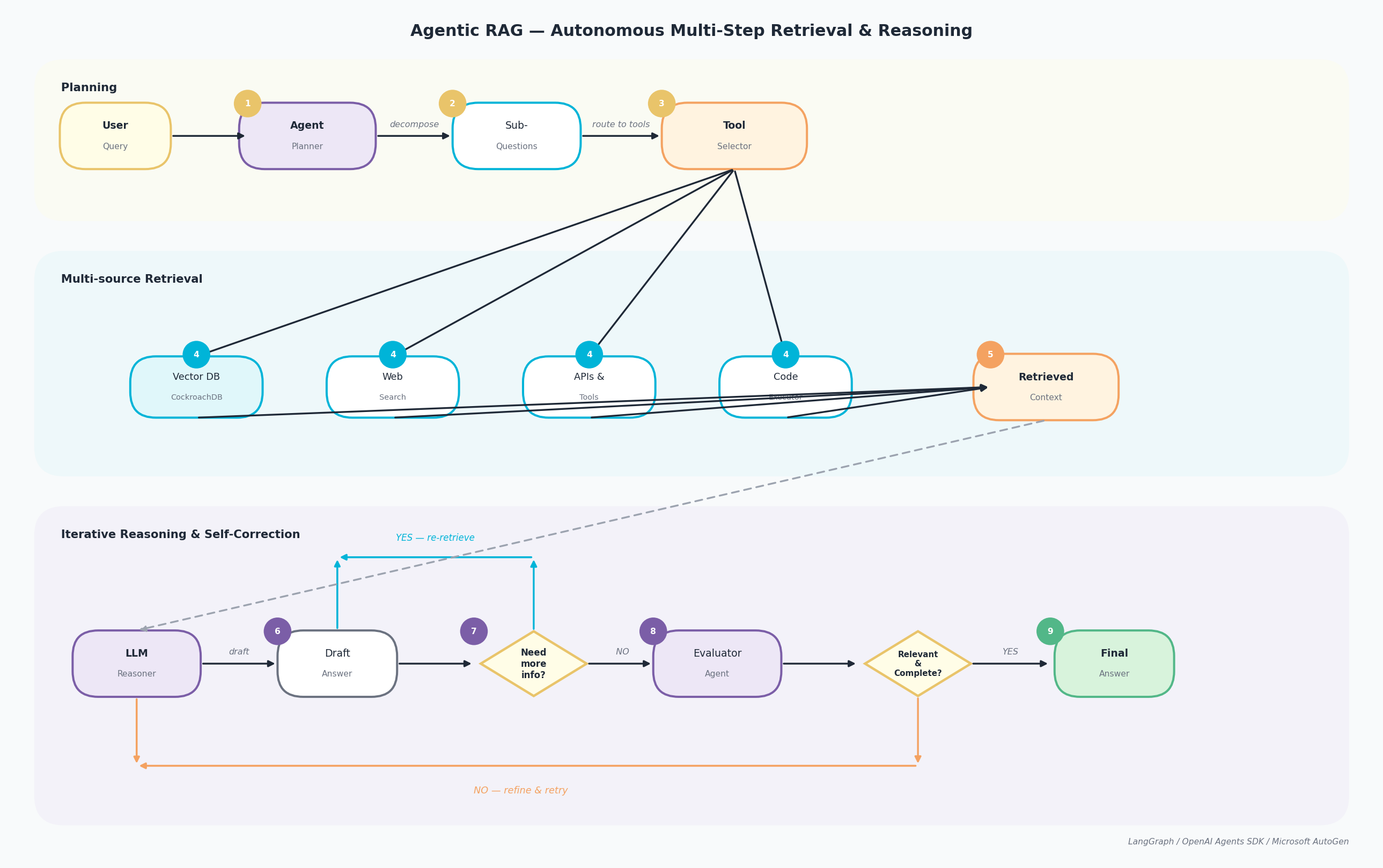
Agentic RAG embeds autonomous AI agents into the pipeline. The LLM acts as an intelligent orchestrator that plans, reasons iteratively, invokes tools, and adapts its retrieval strategy in real time based on intermediate results. The pipeline runs across three concurrent lanes.
Planning
- The User Query arrives at the Agent Planner, which analyses intent and scope.
- The planner decomposes the query into Sub-Questions, each addressable by a specific retrieval source or tool.
- The Tool Selector routes each sub-question to the appropriate backend.
Multi-source Retrieval
- Retrieval executes in parallel across four sources: Vector DB (CockroachDB for semantic search), Web Search (real-time), APIs & Tools (structured data), and Code Executor (programmatic computations).
- All results are aggregated into a Retrieved Context package passed to the reasoning lane.
Iterative Reasoning & Self-Correction
- The LLM Reasoner processes the context and produces a Draft Answer.
- A decision gate asks: “Need more info?” — if YES, the agent loops back to step 3 with a refined sub-question and reruns retrieval.
- If NO, the Evaluator Agent assesses quality: “Relevant & Complete?” — if NO, the answer is refined and re-evaluated.
- If YES, the Final Answer is returned to the user.
-
Strengths: handles complex multi-step reasoning, integrates real-time data via web search and APIs, self-correcting, ideal for exploratory and discovery tasks. Accuracy of 75–90%+ on complex queries.
-
Weaknesses: high latency (10–30+ s), high cost (multiple LLM calls per query), difficult to debug, non-deterministic behaviour, overkill for simple tasks.
-
Use it when: multi-step reasoning is essential, real-time data access is required, the task is exploratory, or human-in-the-loop validation is acceptable.
-
Avoid it when: response time < 2 s, query volume is high with a tight budget, behaviour must be deterministic, or queries are simple lookups.
Comparison: Choosing the Right RAG Paradigm
| Naive RAG | Graph RAG | Agentic RAG | |
|---|---|---|---|
| Complexity | Low | High | Very High |
| Latency | < 2 s | 20–24 s | 10–30 s |
| Cost per query | Low | High | Very High |
| Reasoning depth | Single-hop | Multi-hop (structured) | Multi-hop + branching |
| Accuracy on complex Q | 60–80% | 72–83% | 75–90%+ |
| Real-time data | No | No | Yes |
| Best for | Prototypes, simple lookup | Enterprise synthesis | Complex research tasks |
| Worst for | Complex multi-doc queries | Speed-sensitive apps | High-volume, low-latency |
| Failure mode | Missing context | Slow, expensive | Cascading reasoning errors |
Why Build RAG on CockroachDB?
Unified Storage
CockroachDB stores source documents, metadata, vector embeddings, LLM caches, and conversation history in a single database. There is no synchronisation delay between a separate vector store and your operational data.
Scalability and Resilience
CockroachDB’s distributed SQL architecture provides automatic self-healing from node failures, horizontal scale-out, and continuous availability — purpose-built for business-critical workloads at scale.
Native Vector Store — No Extra Infrastructure
CockroachDB ships a native VECTOR type backed by the C-SPANN distributed index — purpose-built for distributed systems, not just a pgvector wrapper. Key capabilities that matter for RAG workloads:
- C-SPANN indexes — a hierarchical K-means tree stored in CockroachDB’s key-value layer; no single-node bottleneck, no warm-up cost, auto-splits as data grows (see Real-Time Indexing for Billions of Vectors).
- Advanced metadata filtering — filter by any column alongside vector similarity in a single SQL query.
- Multi-tenancy with prefix columns — each user or tenant gets its own index partition; performance is proportional to that tenant’s data, not the total corpus.
Dedicated LangChain Integration
The langchain-cockroachdb package provides a first-class async integration with AsyncCockroachDBVectorStore — supporting document ingestion, similarity search, and metadata filtering, fully compatible with any LangChain chain or agent. Install it with:
pip install langchain-cockroachdb
As soon as an application needs to retrieve data, maintain conversational context, or reason across multiple steps, the amount of custom glue code grows fast. LangChain provides a structured way to orchestrate these workflows — and langchain-cockroachdb makes CockroachDB a drop-in vector source for any LangChain pipeline.
Security and Data Governance
RBAC, Row-Level Security, and native geo-data placement enforce fine-grained permissions over your knowledge base without changing application code.
Tutorial: Building the RAG Pipeline
The tutorial is structured in two parts. Part 1 uses Google Cloud’s Vertex AI (PaLM embeddings + text-bison generation). Part 2 uses Amazon Web Services’ Bedrock (Titan Embeddings + Claude v2). The CockroachDB layer and LangChain pipeline are identical between the two — only the embedding and LLM clients change.
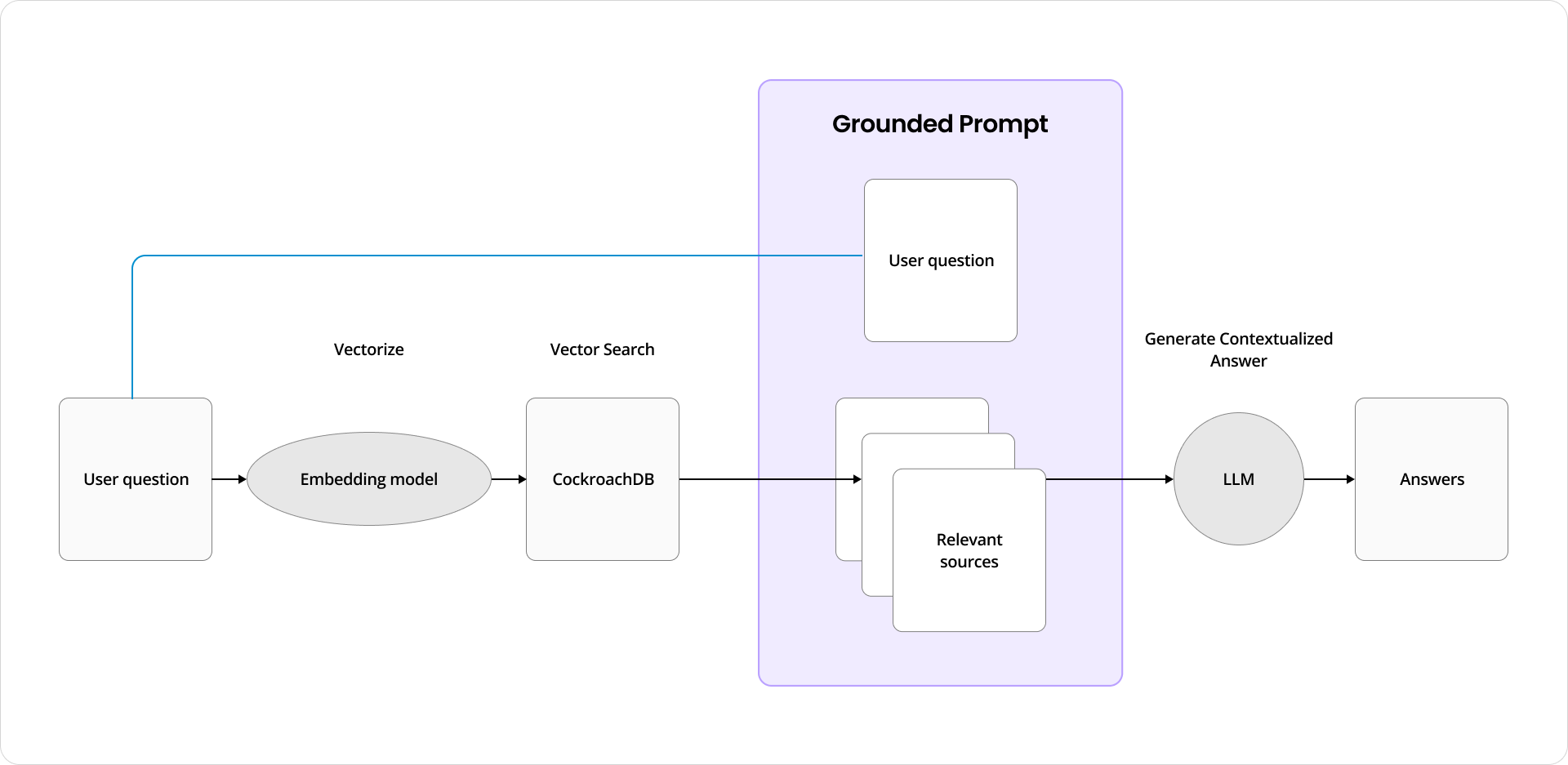
The data flow: user submits a question → it is vectorised → CockroachDB performs similarity search → top-k relevant documents are retrieved → context is injected into the prompt → the LLM generates a grounded answer.
Part 1: CockroachDB + GCP Vertex AI + Memori
Install Dependencies
pip install langchain langchain-community langchain-cockroachdb pypdf tenacity \
    psycopg2-binary sqlalchemy memori "google-cloud-aiplatform==1.25.0" --upgrade
Imports
from glob import glob
from memori import Memori
from langchain.document_loaders import PyPDFLoader, DataFrameLoader
from langchain.text_splitter import RecursiveCharacterTextSplitter
from langchain_cockroachdb import AsyncCockroachDBVectorStore, CockroachDBEngine
from langchain.embeddings import VertexAIEmbeddings
from vertexai.preview.language_models import TextGenerationModel
from sqlalchemy import create_engine, text
import vertexai, hashlib, pandas as pd
Configure GCP Vertex AI, Memori and CockroachDB
from getpass import getpass

PROJECT_ID = getpass("GCP Project ID: ")
REGION     = input("GCP Region (e.g. us-central1): ")
vertexai.init(project=PROJECT_ID, location=REGION)

# Connection string from the CockroachDB Cloud Console
# Format: cockroachdb://user:pass@host:26257/db?sslmode=verify-full
COCKROACHDB_URL = getpass("CockroachDB connection string: ")
engine     = CockroachDBEngine.from_connection_string(COCKROACHDB_URL)
sql_engine = create_engine(COCKROACHDB_URL.replace("cockroachdb://", "postgresql://"))

with sql_engine.raw_connection() as conn:
    cursor = conn.cursor()
    mem = Memori(conn=conn).llm.register(vertexai)
    mem.config.storage.build()
Load and Chunk Documents
pages = []

loaders = [PyPDFLoader(f) for f in glob("docs/pdf/*.pdf")]
for loader in loaders:
    pages.extend(loader.load())

df = pd.read_csv("docs/csv/blogs.csv")
pages.extend(DataFrameLoader(df, page_content_column="text").load())

splitter = RecursiveCharacterTextSplitter(
    chunk_size=5000,
    chunk_overlap=100,
    separators=["\n\n", "\n", "(?<=\\. )", " ", ""],
)
docs = splitter.split_documents(pages)
print(f"{len(docs)} chunks ready for indexing")
Create the CockroachDB Vector Store
AsyncCockroachDBVectorStore handles table initialisation, embedding storage, and C-SPANN index management automatically via the langchain-cockroachdb integration.
embeddings = VertexAIEmbeddings(model="textembedding-gecko@001")

# textembedding-gecko@001 produces 768-dimensional vectors
await engine.ainit_vectorstore_table(
    table_name="knowledge_base",
    vector_dimension=768,
)
vector_store = AsyncCockroachDBVectorStore(
    engine=engine,
    embeddings=embeddings,
    collection_name="knowledge_base",
)
await vector_store.aadd_documents(docs)
print(f"{len(docs)} chunks indexed in CockroachDB")
RAG Generation Pipeline
generation_model = TextGenerationModel.from_pretrained("text-bison@001")

PROMPT = """You are a helpful virtual assistant. Use the sources below as context \
to answer the question. If you don't know the answer, say so.

SOURCES:
{sources}

QUESTION: {query}

ANSWER:"""

async def rag(query: str) -> str:
    relevant = await vector_store.asimilarity_search_with_score(query, k=3)
    sources  = "\n---\n".join(doc.page_content for doc, _ in relevant)
    return generation_model.predict(
        prompt=PROMPT.format(sources=sources, query=query)
    ).text
Standard LLM Cache (SQLAlchemyCache)
The cleanest approach to use an LLM cache on top of CockroachDB is LangChain’s built-in SQLAlchemyCache, which integrates transparently with all LLM calls — no manual hash/UPSERT code needed. Use the sql_engine you already have:
from langchain.globals import set_llm_cache                                                                                                           from langchain.cache import SQLAlchemyCache

set_llm_cache(SQLAlchemyCache(sql_engine))
That’s it! LangChain intercepts every LLM call, checks the cache table (llm_cache) in CockroachDB automatically, and returns the stored response on a hit.
Exact-match cache: if the same query was asked before, internally SQLAlchemyCache returns the stored answer without calling the LLM.
This replaces the entire manual cache block (cache_get, cache_put, @standard_llmcache decorator, etc.). Once set_llm_cache is called, it applies globally to all subsequent LLM calls including inside chains and agents.
Semantic LLM Cache and Conversation History (Memori)
Once mem.llm.register(client) is called, Memori intercepts all LLM calls automatically without any decorator, nor manual cache lookup. It captures facts, preferences, and summaries into CockroachDB and injects relevant context on each subsequent call.
This replaces both the standard cache and the conversation history blocks in the tutorial. Memori handles structured memory, recall, and caching in one layer.
Memori’s semantic cache is built-in — it’s not a separate component to configure. It operates at two levels:
- Tokenless recall (replaces your semantic cache): When a query is semantically similar to a previous one, Memori retrieves only the relevant cached context snippets from CockroachDB — no LLM call, no token spend. This is the “98% cost reduction” claim. It happens automatically once mem.llm.register(client) is called.
- Advanced Augmentation (runs in background): It converts conversations into structured semantic triples (facts, preferences, rules, relationships) stored in CockroachDB. Future queries are matched against this structured store semantically — more precise than raw embedding similarity.
So compared to the manual approach in the tutorial:
| Manual Config | Memori | |
|---|---|---|
| Exact cache | SHA-256 hash → SQL UPSERT | Built-in |
| Semantic cache | asimilarity_search_with_score+ threshold |
Built-in tokenless recall |
| Conversation history | chat_history table + manual inject |
Built-in session memory |
| Config required | Similarity Threshold, decorator, wrapper |
None - intercepted automatically |
The entire manual cache + history block in the tutorial collapses to:
mem = Memori(conn=get_conn).llm.register(client)
mem.attribution(entity_id="user-123", process_id="my-app")
mem.config.storage.build()
NOTE: : You cannot tune the similarity threshold directly, that’s abstracted inside Memori’s recall engine.
Part 2: CockroachDB + Amazon Bedrock
Install Dependencies
pip install langchain langchain-community langchain-cockroachdb pypdf tenacity \
    psycopg2-binary sqlalchemy boto3 botocore --upgrade
Imports
from langchain.document_loaders import PyPDFLoader, DataFrameLoader
from langchain.text_splitter import RecursiveCharacterTextSplitter
from langchain_cockroachdb import AsyncCockroachDBVectorStore, CockroachDBEngine
from langchain.embeddings import BedrockEmbeddings
from langchain.llms import Bedrock
from langchain.chains import ConversationChain
from langchain.memory import ConversationBufferMemory
from sqlalchemy import create_engine, text
import boto3, hashlib, pandas as pd
Configure AWS and CockroachDB
from getpass import getpass

ACCESS_ID  = getpass("AWS Access Key ID: ")
ACCESS_KEY = getpass("AWS Secret Access Key: ")
REGION     = "us-west-2"

bedrock_runtime = boto3.client(
    "bedrock-runtime",
    region_name=REGION,
    aws_access_key_id=ACCESS_ID,
    aws_secret_access_key=ACCESS_KEY
)

# Format: cockroachdb://user:pass@host:26257/db?sslmode=verify-full
COCKROACHDB_URL = getpass("CockroachDB connection string: ")
engine     = CockroachDBEngine.from_connection_string(COCKROACHDB_URL)
sql_engine = create_engine(COCKROACHDB_URL.replace("cockroachdb://", "postgresql://"))
Create the CockroachDB Vector Store
bedrock_embeddings = BedrockEmbeddings(
    model_id="amazon.titan-embed-text-v1",
    client=bedrock_runtime
)

# amazon.titan-embed-text-v1 produces 1536-dimensional vectors
await engine.ainit_vectorstore_table(
    table_name="knowledge_base",
    vector_dimension=1536,
)
vector_store = AsyncCockroachDBVectorStore(
    engine=engine,
    embeddings=bedrock_embeddings,
    collection_name="knowledge_base",
)
await vector_store.aadd_documents(docs)
RAG Generation Pipeline
PROMPT = """You are a helpful virtual assistant. Use the sources below as context \
to answer the question. If you don't know the answer, say so.

SOURCES:
{sources}

QUESTION: {query}

Answer:"""

async def rag(query: str) -> str:
    relevant = await vector_store.asimilarity_search_with_score(query, k=3)
    sources  = "\n---\n".join(doc.page_content for doc, _ in relevant)
    llm      = Bedrock(model_id="anthropic.claude-v2", client=bedrock_runtime)
    chain    = ConversationChain(llm=llm, verbose=False, memory=ConversationBufferMemory())
    return chain.predict(input=PROMPT.format(sources=sources, query=query))
Caching and History
The standard cache and history implementations are identical to Part 1 (using sql_engine). Only the vector store embedding client changes — use bedrock_embeddings (1536 dims) instead of the Vertex AI embeddings:
await engine.ainit_vectorstore_table(
    table_name="llm_semantic_cache",
    vector_dimension=1536,
)
semantic_cache = AsyncCockroachDBVectorStore(
    engine=engine,
    embeddings=bedrock_embeddings,   # Titan instead of Gecko
    collection_name="llm_semantic_cache",
)

@standard_llmcache
async def ask_claude(query): return await rag(query)

@semantic_llmcache
async def ask_claude_semantic(query): return await rag(query)
GCP Vertex AI vs AWS Bedrock: Choosing Your Cloud AI Stack
Both integrations produce identical results from CockroachDB’s perspective — the vector store, caching, and history layers are unchanged. The decision comes down to your cloud strategy, model preferences, and compliance requirements.
| GCP Vertex AI | AWS Bedrock | |
|---|---|---|
| Embedding model | textembedding-gecko@001 (768 dims) |
amazon.titan-embed-text-v1 (1536 dims) |
| Generation model | text-bison@001 / Gemini |
anthropic.claude-v2 / Claude 3 |
| Vector dimensionality | 768 | 1536 |
| LangChain class | VertexAIEmbeddings |
BedrockEmbeddings |
| Auth mechanism | GCP service account / ADC | AWS IAM access keys / role |
| Best for | GCP-native stacks, BigQuery integration | AWS-native stacks, multi-model choice |
| Model variety | Google models (PaLM, Gemini) | AI21, Anthropic, Cohere, Meta, Amazon |
| Pricing model | Per-character input/output | Per-token input/output |
| Compliance | GDPR, HIPAA, SOC 2 | GDPR, HIPAA, SOC 2, FedRAMP |
| Latency | ~200–400 ms (embedding) | ~300–600 ms (embedding) |
Choose Vertex AI if you are already on GCP, use BigQuery as a data source, or need tight Gemini integration. Choose Bedrock if you are on AWS, want access to multiple third-party foundation models (Anthropic, Cohere, Meta) from a single API, or need FedRAMP compliance.
Both are equally well-suited to any of the three RAG paradigms described above — Naive, Graph, or Agentic — with CockroachDB serving as the unified data layer across all of them.
Resources
- CockroachDB vector search documentation
- langchain-cockroachdb — LangChain integration for CockroachDB
- Agent Development with CockroachDB using LangChain
- From Local to Global: Microsoft GraphRAG paper (arXiv 2404.16130)
- Agentic RAG survey (arXiv 2501.09136)
- Amazon Bedrock model catalogue
- Google Vertex AI — Generative AI
- Original RAG notebook — GCP
- Original RAG notebook — AWS
- Memori Labs
- Memori Labs Github Repository