
The way AI systems interact with databases is undergoing a fundamental shift. For decades, databases served as passive backends, waiting for application code to issue queries. Today, AI agents actively interrogate, modify, and operate databases with minimal human intervention. This requires a new kind of infrastructure: one that is structured, secure, auditable, and model-agnostic.
CockroachDB has embraced this shift head-on. In March 2026, Cockroach Labs announced a suite of agent-ready capabilities: a fully managed MCP Server, a redesigned ccloud CLI, and a public library of CockroachDB Agent Skills. Alongside this, the open-source CockroachDB MCP Server, a community project, provides a comprehensive natural language interface for AI agents to manage, monitor, and query CockroachDB directly.
This article covers all three dimensions of CockroachDB’s agent-ready story: the open-source MCP server, the managed enterprise MCP endpoint, and the agent skills system for database lifecycle automation.
What is the Model Context Protocol?
The Model Context Protocol (MCP) is an open standard introduced by Anthropic that enables AI applications to communicate uniformly with external tools and data sources, from file systems to APIs to databases. Think of it as the “USB-C for AI”: a single, interoperable plug that lets any LLM-powered agent connect to any tool without bespoke integration code.
Before MCP, getting an LLM agent to query a database meant manually feeding it schema information, writing custom integration code, and managing security concerns for every new model or agent framework. MCP eliminates this overhead by providing a standardized discovery and invocation layer.
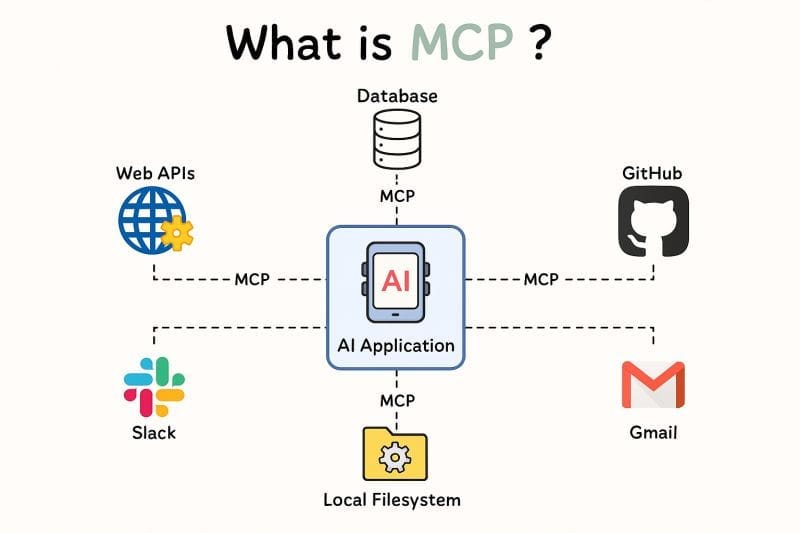
Model Context Protocol Overview
The CockroachDB MCP Server (Community Project)
The CockroachDB MCP Server is an open-source Python project that bridges AI language models with CockroachDB through the Model Context Protocol. It integrates with MCP-compatible clients such as Claude Desktop, Cursor, VS Code with GitHub Copilot, and the OpenAI Agents SDK.
CockroachDB is not a typical monolithic database. It is a distributed SQL database where data is automatically sharded into “ranges” and replicated across multiple nodes. The MCP server exposes this complexity through 29 distinct tools organized into four categories, enabling AI agents to interact with the full breadth of CockroachDB’s capabilities, from cluster health to transactional data operations, using natural language.
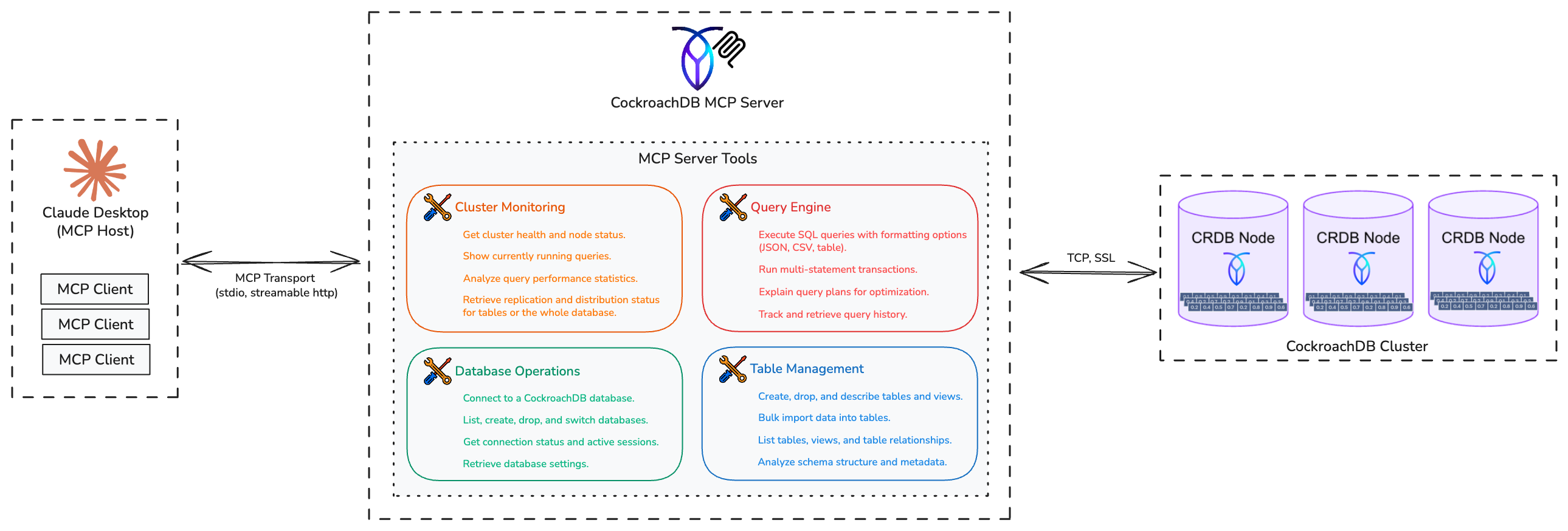
CockroachDB MCP Server Architecture
Tool Categories
Cluster Monitoring
| Tool | Description |
|---|---|
get_cluster_status |
Cluster health and node distribution |
show_running_queries |
Currently active queries |
analyze_performance |
Query performance statistics |
get_replication_status |
Replication and distribution status |
Database Operations
| Tool | Description |
|---|---|
connect / connect_database |
Establish connections |
list_databases |
Show all databases |
create_database / drop_database |
Database lifecycle |
switch_database |
Change active database |
get_active_connections |
Active user sessions |
get_database_settings |
Current configuration |
Table & Schema Management
| Tool | Description |
|---|---|
list_tables / list_views |
Schema discovery |
create_table / drop_table |
Table management |
create_index / drop_index |
Index management |
describe_table |
Schema information |
analyze_schema |
Full database overview |
get_table_relationships |
Foreign key analysis |
bulk_import |
Cloud storage data loading (S3, GCS, Azure) |
Query & Transaction Execution
| Tool | Description |
|---|---|
execute_query |
SQL query execution (JSON, CSV, table output) |
execute_transaction |
Atomic multi-statement operations |
explain_query |
Query execution plan analysis |
get_query_history |
Query audit trail |
Installation
Quick start with uvx (no local clone required):
uvx --from git+https://github.com/amineelkouhen/mcp-cockroachdb.git@0.1.0 cockroachdb-mcp-server \
  --url postgresql://localhost:26257/defaultdb
Individual parameters:
uvx --from git+https://github.com/amineelkouhen/mcp-cockroachdb.git cockroachdb-mcp-server \
  --host localhost --port 26257 --database defaultdb --user root --password mypassword
SSL connection:
uvx --from git+https://github.com/amineelkouhen/mcp-cockroachdb.git cockroachdb-mcp-server \
  --url postgresql://user:pass@cockroach.example.com:26257/defaultdb?sslmode=verify-full&sslrootcert=path/to/ca.crt&sslcert=path/to/client.username.crt&sslkey=path/to/client.username.key
From source (development):
git clone https://github.com/amineelkouhen/mcp-cockroachdb.git
cd mcp-cockroachdb
uv venv
source .venv/bin/activate
uv sync
uv run cockroachdb-mcp-server --help
Docker Compose (local development):
docker compose up -d
# MCP server: http://localhost:8000/mcp/
# CockroachDB UI: http://localhost:8080
docker compose logs -f mcp-server
Configuration
The server accepts CLI arguments, environment variables, and default values in that precedence order.
| Variable | Description | Default |
|---|---|---|
CRDB_HOST |
Hostname/address | 127.0.0.1 |
CRDB_PORT |
SQL interface port | 26257 |
CRDB_DATABASE |
Database name | defaultdb |
CRDB_USERNAME |
SQL user | root |
CRDB_PWD |
User password | |
CRDB_SSL_MODE |
SSL mode | disable |
CRDB_SSL_CA_PATH |
CA certificate path | |
CRDB_SSL_CERTFILE |
Client certificate path | |
CRDB_SSL_KEYFILE |
Client key path |
Client Integrations
Claude Desktop (claude_desktop_config.json):
{
    "mcpServers": {
        "cockroach-mcp-server": {
            "type": "stdio",
            "command": "/opt/homebrew/bin/uvx",
            "args": [
                "--from", "git+https://github.com/amineelkouhen/mcp-cockroachdb.git",
                "cockroachdb-mcp-server",
                "--url", "postgresql://localhost:26257/defaultdb"
            ]
        }
    }
}
VS Code with GitHub Copilot (settings.json):
{
  "chat.agent.enabled": true,
  "mcp": {
    "servers": {
      "CockroachDB MCP Server": {
        "type": "stdio",
        "command": "uvx",
        "args": [
          "--from", "git+https://github.com/amineelkouhen/mcp-cockroachdb.git",
          "cockroachdb-mcp-server",
          "--url", "postgresql://root@localhost:26257/defaultdb"
        ]
      }
    }
  }
}
Cursor (~/.cursor/mcp.json):
{
  "mcpServers": {
    "cockroach-mcp-server": {
      "type": "stdio",
      "command": "uvx",
      "args": [
        "--from",
        "git+https://github.com/amineelkouhen/mcp-cockroachdb",
        "--url",
        "postgresql://root@localhost:26257/defaultdb?sslmode=disable"
      ]
    }
  }
}
Docker (Claude Desktop):
{
  "mcpServers": {
    "cockroach": {
      "command": "docker",
      "args": ["run", "--rm", "--name", "cockroachdb-mcp-server",
        "-e", "CRDB_HOST=<host>",
        "-e", "CRDB_PORT=<port>",
        "-e", "CRDB_DATABASE=<database>",
        "-e", "CRDB_USERNAME=<user>",
        "mcp-cockroachdb"]
    }
  }
}
To troubleshoot Claude Desktop on macOS: tail -f ~/Library/Logs/Claude/mcp-server-cockroach.log
Real-World Use Cases
Use Case 1: AI-Powered Database Administrator
An example prompt for diagnosing intermittent slowdowns:
“Hey, can you check the health of my CockroachDB cluster? Show me any long-running queries. Also, please analyze the query plan for
SELECT * FROM users WHERE last_active < NOW() - INTERVAL '30 days'and tell me if it’s using an index.”
Behind the scenes the agent orchestrates: get_cluster_status → show_running_queries → explain_query, then synthesizes the results with optimization suggestions.
Use Case 2: Rapid Prototyping Assistant
“I’m building a new feature. Please create a new table called
feature_flagswith columns forid(UUID, primary key),name(STRING, unique),is_enabled(BOOL, default true), andcreated_at(TIMESTAMP). Once that’s done, bulk import the initial flags from the CSV file ats3://my-company-data/dev/feature_flags.csv.”
The agent combines create_table DDL execution with bulk_import in sequence, then confirms the record count.
CockroachDB is Built for AI Agents
Beyond the community MCP server, Cockroach Labs has announced a set of native, enterprise-grade agent capabilities. AI systems behave differently from traditional services: they fan out work, retry aggressively, and generate bursts of concurrent writes across regions. CockroachDB handles this expanded load through automatic data distribution, horizontal scaling, and serializable isolation by default.
How AI Agents Use Databases
There are two major interaction patterns:
-
Application backend: AI systems require databases supporting always-on availability and multi-region deployments. CockroachDB handles this through distributed data and horizontal scale without manual partitioning.
-
Interaction surface: Agents assist with the full database lifecycle: provisioning clusters, reviewing schemas, and triaging alerts.
What “Agent-Ready” Means
An agent-ready database requires:
- Structured interfaces: reliable, machine-interpretable outputs
- Scoped permissions: governing what agents can and cannot do
- Auditability: complete action logging for every agent operation
- Model-agnostic interfaces: compatibility across frameworks and LLM providers
CockroachDB’s Managed MCP Server
The Managed MCP Server is a Cloud-hosted MCP endpoint designed for enterprise environments with shared agent systems. Unlike the community server, it requires no local deployment: developers copy a configuration snippet from the Cloud Console and paste it into their MCP client within minutes.
Endpoint: https://cockroachlabs.cloud/mcp
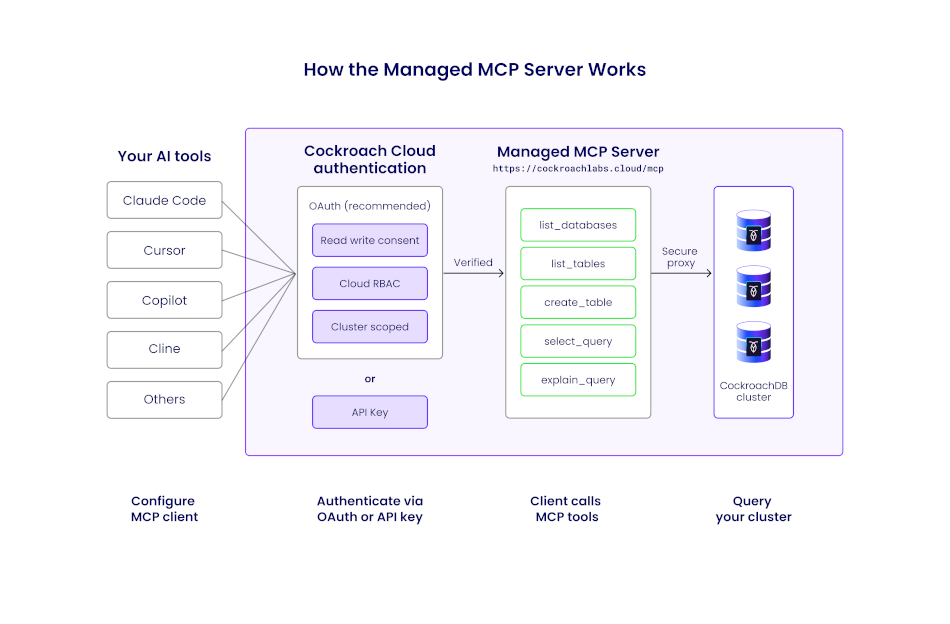
How the CockroachDB Managed MCP Server Works
Request Flow
Each MCP request follows this path:
- MCP client (e.g., Claude Code) sends a JSON-RPC request over HTTPS
- Request passes through a load balancer
- The internal
mcp-serviceroutes/mcptraffic to the MCP handler - The middleware pipeline enforces auth, rate limits, and logging
- A tool handler performs authorization and executes the requested operation
- Results are returned as an MCP-compliant JSON-RPC response
The implementation uses the official modelcontextprotocol/go-sdk. HTTP transport is supported and recommended; SSE transport is intentionally excluded (deprecated in MCP).
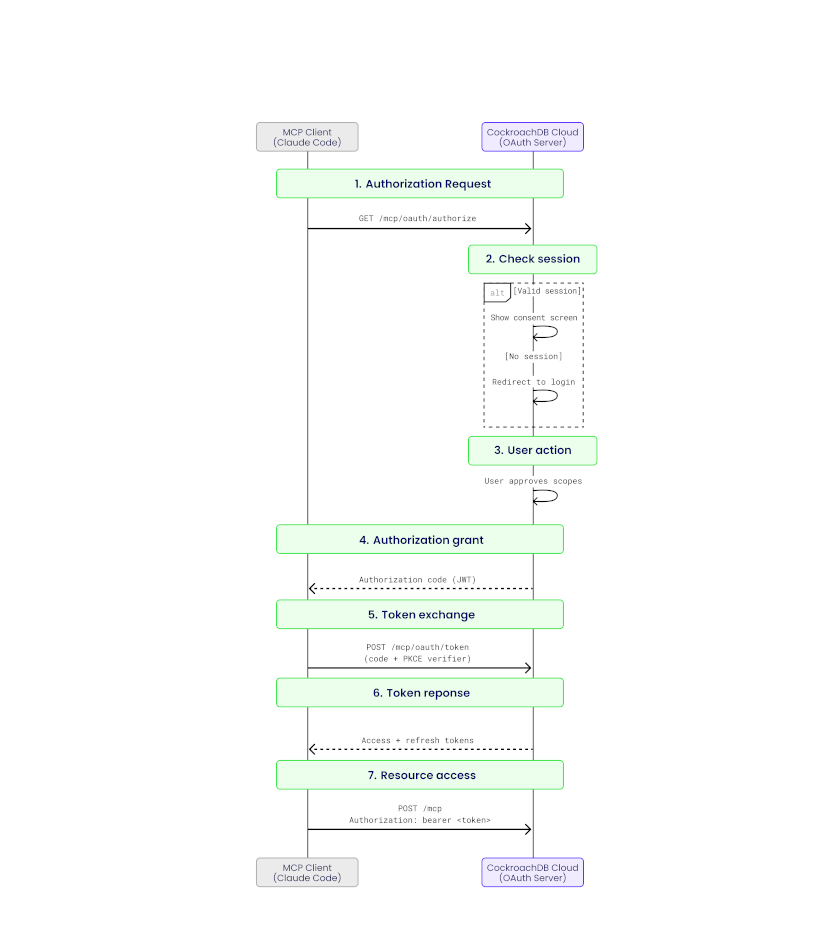
Managed MCP Server Architecture
Security: Authentication and Authorization
Two authentication mechanisms are supported:
- OAuth 2.1 (Authorization Code Flow with PKCE): For interactive user workflows with scoped permissions:
mcp:readfor safe, read-only accessmcp:writefor controlled mutations
- Service account API keys: For fully autonomous environments with Cloud RBAC roles scoped to specific clusters
Every tool invocation performs a Cloud RBAC check before execution. Requests are rejected if permissions exceed the expected scope.
Read and Write Consent
Read-only consent permits only safe, introspective tools such as list_databases, select_query, and get_table_schema. Write operations are explicitly blocked and system tables are deny-listed to prevent sensitive access.
Write consent enables additional tools such as create_database, create_table, and insert_rows. Destructive SQL operations (DROP, TRUNCATE) remain unsupported.
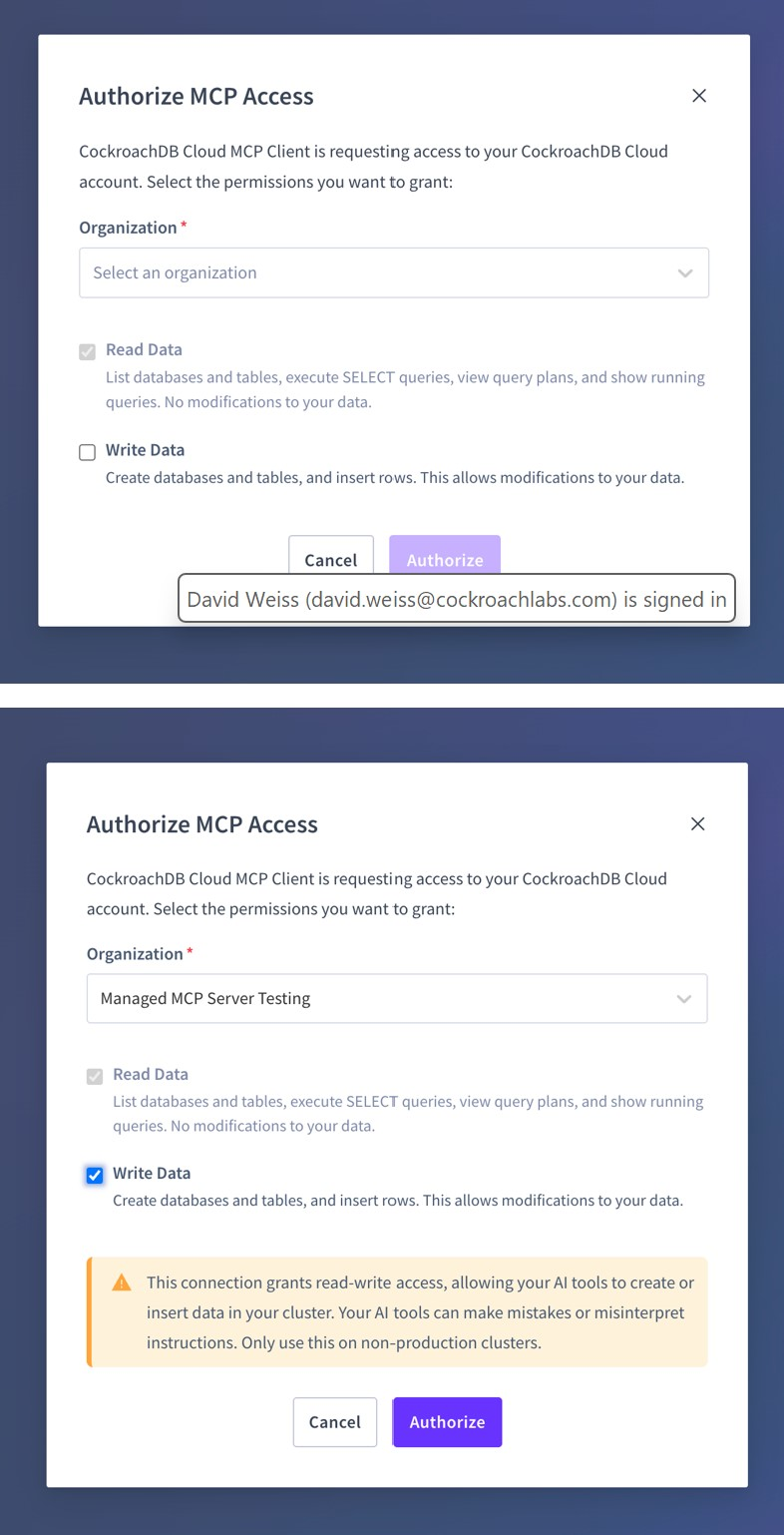
Authorizing MCP Access: Read and Write Consent
Observability
All requests emit structured logs tagged with mcp, including:
- Tool name
- Cluster and organization context
- Redacted SQL shape
- Latency and response size
- MCP-specific error codes
End-to-end traces flow into the observability pipeline, with spans covering middleware steps, API calls, and database queries. Tool usage events are sent to the analytics pipeline, enabling analysis of adoption patterns and real-world workflows.
Getting Started
- Log into the CockroachDB Cloud Console
- Navigate to your cluster, click the Connect modal, and select the MCP integration option
- Copy the generated configuration snippet
- Paste the snippet into your MCP client’s configuration file (Claude Code, Cursor, or VS Code)
- Start asking your AI assistant questions about your database
Community MCP Server vs. Managed MCP Server: An Objective Comparison
To understand why this comparison matters, it helps to situate it in the broader evolution of AI-assisted development. Independent analysis identifies three distinct eras:
- Pre-AI era: Developers manually coded every interaction, switching between separate tools for querying, monitoring, and schema management.
- Copilot era (2021–2024): AI entered the picture as a passive assistant, providing code completion and suggestions, but humans still drove every action.
- Agentic era (2025+): AI transitions from passive copilot to active agent, delegating entire tasks autonomously. MCP is the critical infrastructure enabling this shift: a standardization layer that lets any agent discover and invoke any tool without bespoke integration code.
Both options covered here sit squarely in this agentic era, but they represent different philosophies about where safety, control, and flexibility should live.
Deployment and Operations
The community server is self-hosted: you run it on your own infrastructure via uvx, Docker, or from source. You control the binary, the configuration, and the upgrade cycle. Every line of Python is readable and forkable on GitHub. The official Docker image is hosted under the mcp/ namespace on Docker Hub, a marker of the project’s significance in the community, even though it is not an official Cockroach Labs product. The author’s position as a Senior Partner Solutions Architect at Cockroach Labs lends the project a high degree of authority and trustworthiness.
The managed server is zero-ops: Cockroach Labs hosts it at https://cockroachlabs.cloud/mcp. There is nothing to deploy, upgrade, or monitor on your end. Customers automatically receive protocol enhancements as MCP evolves, without tracking specification changes or redeploying services. For teams that want to evaluate or ship fast, this eliminates all infrastructure friction.
Tool Coverage and Capabilities
The community server exposes 29 tools spanning the full operational spectrum, from get_cluster_status and show_running_queries to create_database, drop_table, create_index, bulk_import, and execute_transaction. It is the clear choice for developers who need a full-stack tool: its inclusion of administrative and monitoring capabilities makes it uniquely powerful for end-to-end development and light operational tasks. The bulk_import tool alone, enabling direct data ingestion from Amazon S3, Azure Blob Storage, and Google Cloud Storage, has no equivalent in the managed offering.
The managed server provides a curated, safety-scoped toolset. In read-only mode it permits introspective tools (list_databases, select_query, get_table_schema). Write consent unlocks additive operations (create_database, create_table, insert_rows). Destructive SQL (DROP, TRUNCATE) is permanently unsupported. This deliberate constraint is a feature, not a limitation: it makes the managed server suitable for production environments where an agent error must never result in data loss.
Security Model
| Dimension | Community Server | Managed Server |
|---|---|---|
| Authentication | DB username/password + SSL certificates | OAuth 2.1 (PKCE) or service account API keys |
| Authorization | DB user privileges | Cloud RBAC checked per tool invocation |
| Scope control | Set at DB user level | mcp:read / mcp:write consent tokens |
| Audit logging | Local process logs | Structured telemetry in Cloud observability pipeline |
| Destructive ops | Allowed (controlled by DB user) | Blocked at the MCP layer |
The community server is a bridge: its security posture depends entirely on how you configure it, not on anything the server enforces itself. Independent security analysis is explicit on this point: exercise extreme caution before connecting it to a production database with write permissions. When you do deploy it, follow these practices:
- Create a dedicated SQL user with minimum required privileges (never connect as
root) - Apply network segmentation and firewall rules so only the MCP process can reach the database port
- Regularly review both MCP server logs and database audit logs for unexpected activity
- Run the server in Docker for additional isolation, using the official
mcp/cockroachdbimage
The managed server enforces least-privilege by design: every tool invocation is independently authorized against Cloud RBAC, and requests exceeding scope are rejected before reaching the database. There is no operator configuration required to achieve this posture; it is the default.
Observability
Community server logs are local to the process and must be integrated into your own monitoring stack. The iterative feedback loop (prompt, AI action, direct data validation) is visible only within your own tooling. The managed server emits structured logs tagged with mcp for every request, including tool name, cluster context, redacted SQL shape, latency, and MCP-specific error codes, feeding directly into Cockroach Labs’ observability and analytics pipelines with end-to-end tracing.
Customization and Extensibility
The community server is fully extensible: fork the repository, add new tools, modify behavior, and submit pull requests. It supports both stdio and http transports, with streamable HTTP planned as the next transport addition to enable more flexible deployment in web-based or serverless environments. Future roadmap items also include deeper IAM controls and more granular performance tuning tools. The project is MIT-licensed and openly welcomes contributions.
The managed server is not customizable in the traditional sense; you consume what Cockroach Labs ships. However, because it is continuously improved without operator intervention, you benefit from every MCP specification update and CockroachDB Cloud API enhancement automatically.
The Community Server Among CockroachDB MCP Implementations
Several open-source CockroachDB MCP servers exist in the ecosystem. Understanding where amineelkouhen/mcp-cockroachdb sits relative to them is important, because it is precisely its completeness that makes it the right peer to compare against the official managed offering. This assessment is supported by independent analyses from Skywork’s engineer’s guide and deep-dive review.
| Implementation | Language | Tool Count | Cluster Monitoring | Schema Mgmt | Bulk Import | Transactions | Access |
|---|---|---|---|---|---|---|---|
| amineelkouhen/mcp-cockroachdb | Python | 29 | ✅ Full | ✅ Full | ✅ S3/GCS/Azure | ✅ Atomic | Read + Write |
| Swayingleaves/cockroachdb-mcp-server | Python (psycopg2) | 6 (connect, disconnect, initialize, get_tables, get_table_schema, execute_query) |
❌ | Partial | ❌ | ❌ | Read + Write |
| dhartunian/cockroachdb-mcp-server | Node.js / TypeScript | 1 (query) |
❌ | ❌ | ❌ | ❌ | Read + Write (limited) |
| CData cockroachdb-mcp-server-by-cdata | Java / JDBC | 3 (get_tables, get_columns, run_query) |
❌ | ❌ | ❌ | ❌ | Read-only |
The gaps are significant. Swayingleaves focuses narrowly on connection stability, specifically keep-alive and auto-reconnect, but lacks monitoring and schema management. Hartunian’s TypeScript server is stripped to the absolute minimum: a single query tool that executes SQL with no schema introspection, no monitoring, and no administrative surface. CData’s Java implementation is read-only by design, exposing only 3 tools (get_tables, get_columns, run_query), suited for business users querying live data without SQL, but unusable for anything operational.
amineelkouhen/mcp-cockroachdb is the only community implementation that covers the full developer-to-ops spectrum: cluster health and replication monitoring, complete DDL (create, alter, drop), index management, bulk data ingestion from cloud storage, atomic multi-statement transactions, and query plan analysis, all in a single server. It is also the only implementation with an official Docker image hosted under the mcp/ namespace on Docker Hub, a marker of maturity and community trust that the others lack.
This completeness is exactly what justifies placing it alongside the managed server for comparison. The other community implementations compete in a different weight class; they are lightweight query tools. amineelkouhen/mcp-cockroachdb is a full database management interface exposed to AI agents, which is the same ambition as the managed server, just delivered through a different operational model.
CockroachDB in the Broader Database MCP Ecosystem
Zooming out further, CockroachDB MCP servers occupy a distinct niche relative to other database MCP implementations:
| Server | Best For | Access Model |
|---|---|---|
| CockroachDB (A. El Kouhen) | Distributed operational database: developer workflow and ops | Full admin |
| PostgreSQL (Anton O.) | Single-node developer workflow, simplicity, direct access | Read + Write |
| MongoDB (Official) | Data exploration and secure schema inspection | Read-only |
| DuckDB (MotherDuck) | Local and cloud analytics, hybrid SQL execution | Analytics |
The CockroachDB community server occupies a unique position: it targets the full developer-to-ops workflow for a distributed, operationally complex database. This contrasts with PostgreSQL servers that emphasize simplicity, the official MongoDB server that prioritizes secure read-only exploration, and DuckDB servers focused purely on analytics. No other database MCP server in the ecosystem combines cluster health monitoring, DDL management, bulk cloud import, and transactional query execution in a single interface.
When to Use Which
| Scenario | Recommended |
|---|---|
| Local development, schema exploration, prototyping | Community server |
| Full cluster administration via AI (index management, bulk import) | Community server |
| Non-technical users querying data in natural language | Community server |
| Open-source contributors and tool builders | Community server |
| Production agent access with enterprise security requirements | Managed server |
| Multi-tenant or shared agent environments | Managed server |
| Regulated industries requiring audit trails | Managed server |
| Teams without infrastructure capacity to self-host | Managed server |
In practice, the two are complementary rather than competitive. Many teams use the community server during development, where full administrative access, code transparency, and iterative feedback loops matter most, and graduate to the managed server for production workloads where safety, observability, and zero-ops maintenance take precedence.
AI Agent Skills for Database Lifecycle Automation
CockroachDB Agent Skills are structured capabilities that define how an AI system interacts with CockroachDB. They follow open standard interfaces, making them portable across different models and tools without rewriting integrations. Teams can use agent skills throughout the full database lifecycle: onboarding, development, operations, and scaling decisions.
To understand where skills fit in an agentic system, it helps to think in three layers:
-
Agents are the orchestrators: they decide when to do the work. An agent receives a goal (e.g., “investigate this CPU spike”) and plans a sequence of actions to accomplish it. It chooses which tools to call and in what order, retries on failure, and synthesizes results into a response.
-
Skills are the expertise: they teach the agent how to do the work correctly. A skill encodes domain knowledge: the right CockroachDB SQL patterns to use, which indexes are appropriate for a given workload, how to interpret a query plan, or when to recommend a hash-sharded primary key versus a composite one. Without skills, an agent might produce syntactically valid but semantically wrong SQL.
-
MCP tools are the connectors: they provide the what, the actual interface to the database. Tools are the concrete actions an agent can take (
execute_query,explain_query,get_cluster_status). They carry no judgment about when or how to use them; that is the agent’s and skill’s responsibility.
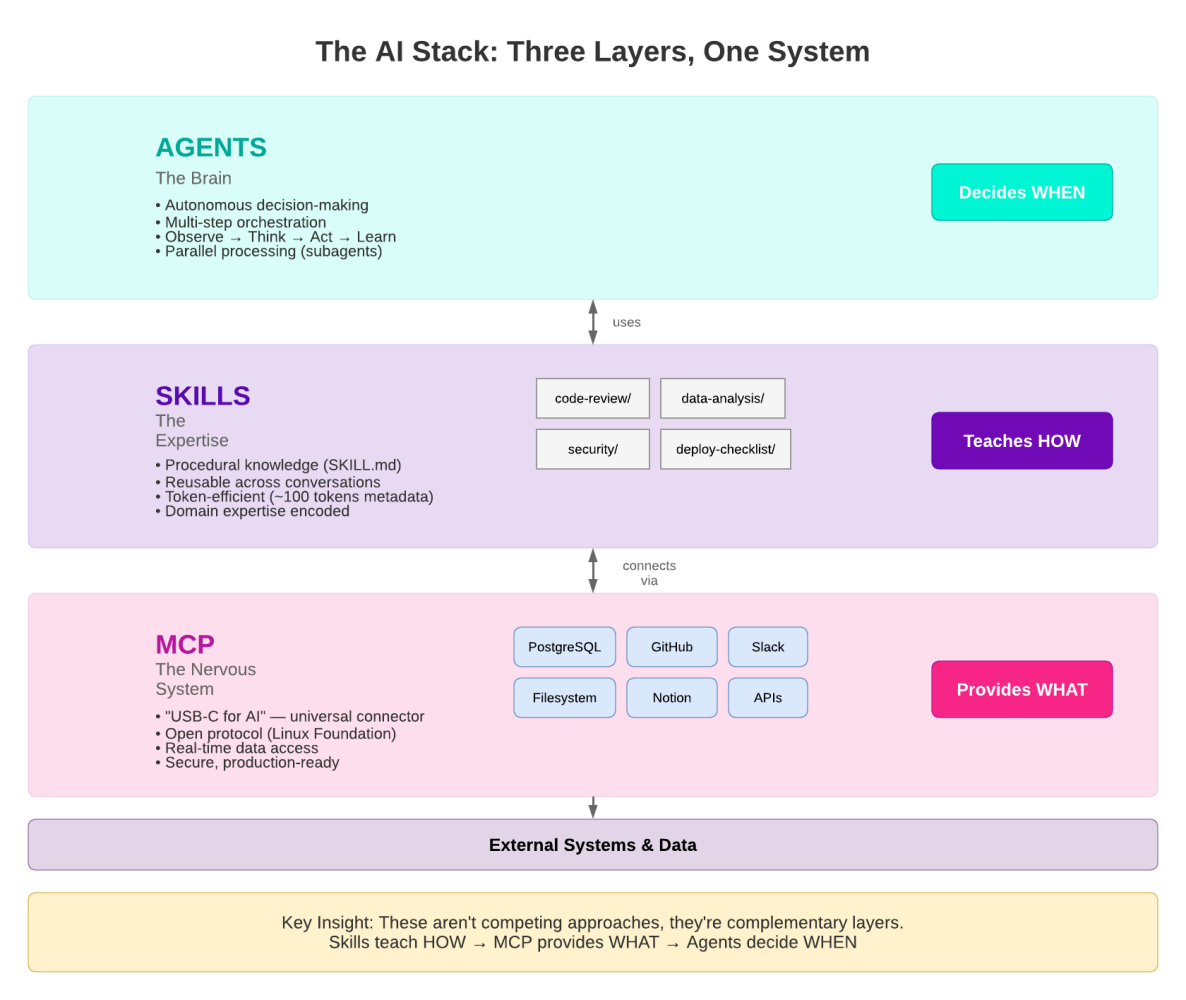
Agents, Skills, and MCP Tools: The Three Layers of Agentic Database Interaction
The cockroachlabs/cockroachdb-skills repository is the official source for these skills. You can install the full collection into any Agent Skills-compatible tool with a single command:
npx skills add cockroachlabs/cockroachdb-skills
Nine Skill Domains
1. Onboarding and Migrations
Skills that guide teams through getting started with CockroachDB and moving existing workloads into the system. This includes schema translation from PostgreSQL, using MOLT for data movement, shadow traffic validation, and safe cutover strategies that minimize downtime.
2. Application Development
Skills that help developers build applications using CockroachDB effectively, covering connection pooling best practices, transaction retry logic, ORM compatibility patterns, and distributed SQL idioms that differ from traditional single-node databases.
3. Performance and Scaling
Skills that diagnose and resolve query performance issues: analyzing execution plans, identifying missing indexes, recommending hash-sharded primary keys for high-write workloads, interpreting range distribution, and guiding horizontal scale-out decisions under load.
4. Operations and Lifecycle
Skills for day-to-day cluster operations and version management, including rolling upgrades, node decommissioning, backup and restore scheduling, and cluster finalization procedures after major version upgrades.
5. Resilience and Disaster Recovery
Skills that ensure high availability and prepare teams for failure scenarios: configuring replication zones, validating multi-region survival goals, designing for zone and region failure, and testing recovery runbooks before incidents occur.
6. Observability and Diagnostics
Skills that monitor, alert, and diagnose issues across the cluster, profiling SQL statements, interpreting contention events, diagnosing hot ranges, monitoring background jobs, and correlating application errors with database metrics.
7. Security and Governance
Skills that harden CockroachDB deployments: configuring RBAC and row-level security, enforcing TLS and certificate rotation, auditing access patterns, and aligning configurations with compliance frameworks such as SOC 2 and PCI-DSS.
8. Integrations and Ecosystem
Skills for connecting CockroachDB to external tools and platforms, including CDC (Change Data Capture) to Kafka and cloud pub/sub systems, Kafka Connect sink configurations, and integration patterns with data warehouses and analytics platforms.
9. Cost and Usage Management
Skills that help teams understand and optimize resource consumption: right-sizing clusters, interpreting storage amplification, analyzing statement statistics for cost attribution, and identifying workloads that are disproportionately consuming cluster resources.
Real-World Scenario: CPU Spike Response
Consider a practical example where an agent receives a “High CPU utilization” alert on a staging cluster. The sequence below shows how CockroachDB Agent Skills guide Claude Code through the investigation and resolution, step by step.
Step 1: Receive the alert and connect
The agent is prompted with the alert context and connects to the cluster via the managed MCP server. The Observability and Diagnostics skill immediately directs it to check background jobs and active statement statistics.
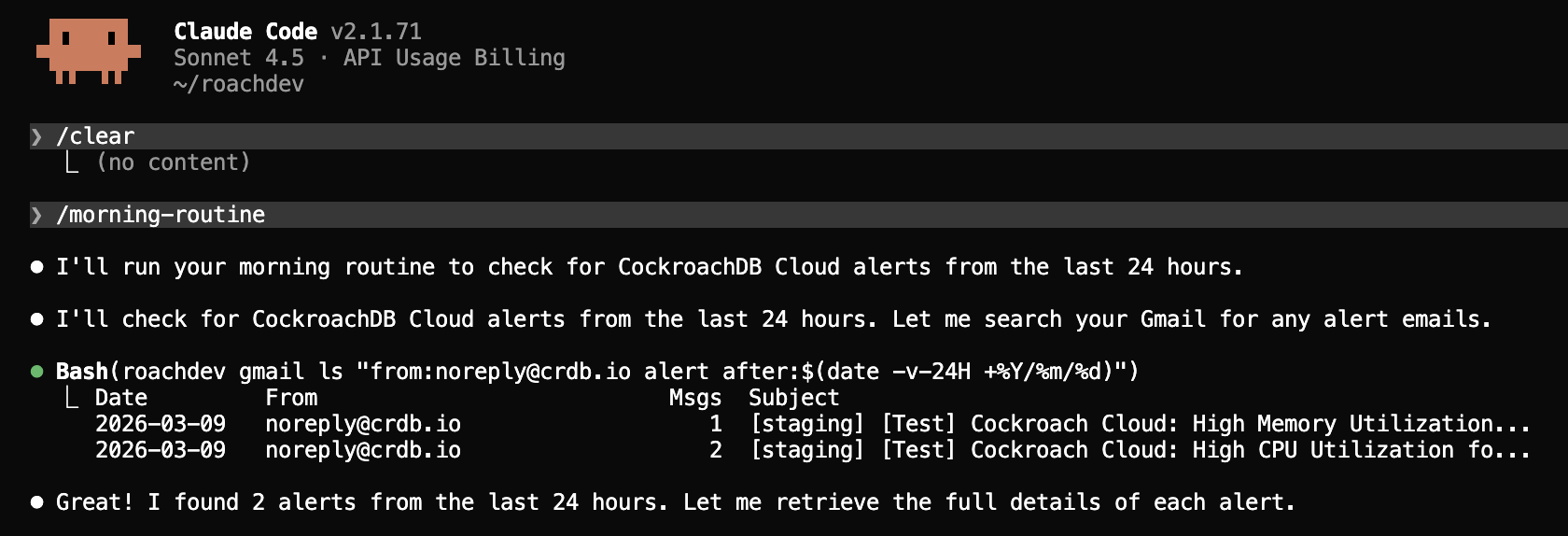
Step 1: Agent receives CPU alert and connects to the cluster
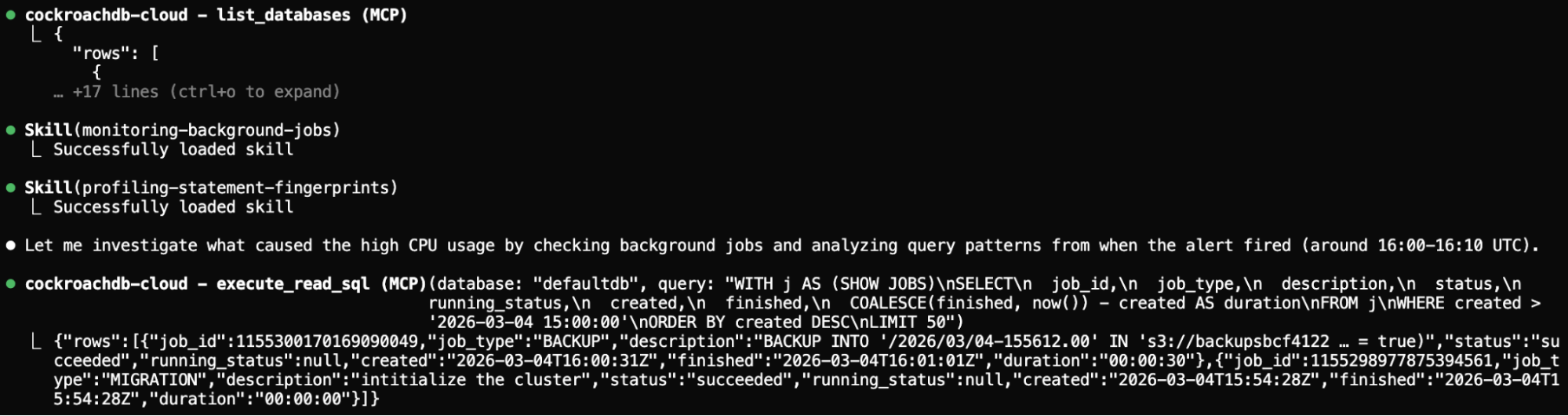
Step 2: Monitor background jobs and profile SQL statements
Using the Observability and Diagnostics skill, the agent calls show_running_queries and analyze_performance to surface long-running queries and identify which statements are consuming the most CPU.
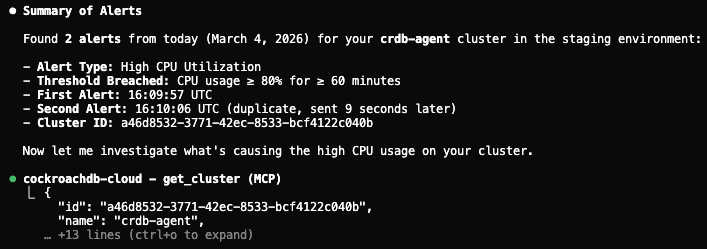
Step 2: Agent monitors background jobs and profiles SQL statements
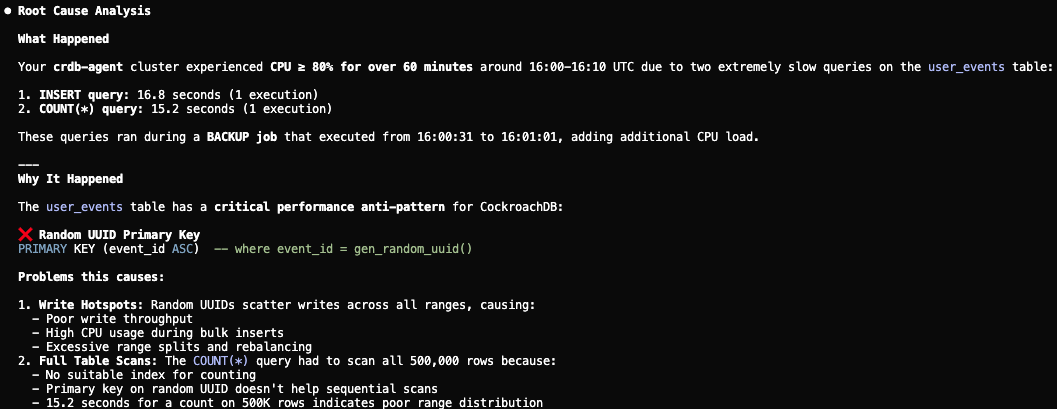
Step 3: Identify root causes
The Performance and Scaling skill guides the agent to run explain_query on the top offending queries. It identifies expensive full-table scans on the user_events table and a backup job overlapping with peak traffic.
Step 3: Agent identifies root causes (full scans and backup overlap)
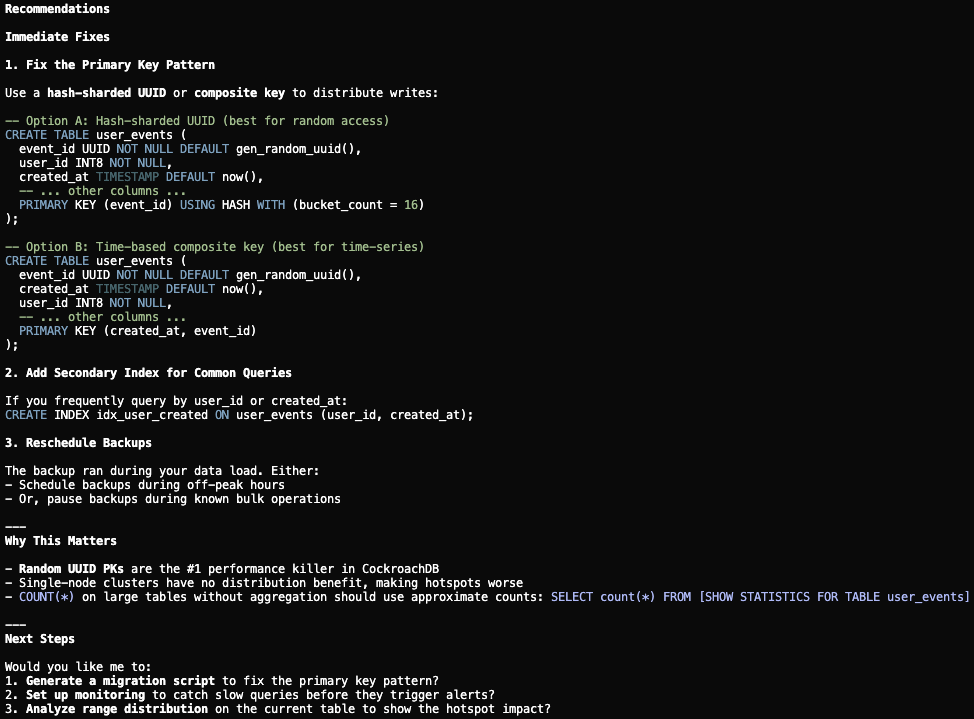
Step 4: Diagnose schema issues
The Performance and Scaling skill further flags a suboptimal UUID primary key pattern causing write hotspots. The agent proposes replacing it with a hash-sharded primary key and adding supporting indexes to eliminate the scans.
Step 4: Agent diagnoses UUID hotspot and proposes hash-sharded primary key
Step 5: Generate migration scripts for human review
The Operations and Lifecycle skill ensures the agent does not apply changes directly. Instead, it generates migration scripts (DDL for the schema change, a revised backup schedule, and a rollback plan) for an engineer to review and approve before execution.
Step 5: Agent generates migration scripts for human review
This workflow is conversational, structured, auditable, and human-approved at every decision point, exactly the pattern that CockroachDB Agent Skills are designed to enforce.
Three Interfaces, One Agent-Ready Database
The three components serve different scenarios and audiences:
| Interface | Best For |
|---|---|
| Open-source MCP Server | Developers, local clusters, full administrative control |
| Managed MCP Server | Enterprise teams, shared agent systems, production safety |
| Agent Skills | Cross-framework portability, structured reasoning, lifecycle automation |
ccloud CLI |
Developer agents operating through shell commands, CI/CD pipelines |
Together, they reflect a deliberate architectural philosophy: CockroachDB exposes internal state (statement statistics, execution plans, contention events, range distribution, replication status) through structured interfaces that agents can reliably interpret and act upon.
As Spencer Kimball, CEO of Cockroach Labs, put it: “All of the activity that databases have had to deal with up till now has been humans. Now it’s going to be agents… You could have a trillion.”
The age of the AI agent is here, and CockroachDB is built for it.
Resources
- CockroachDB MCP Server (open-source)
- CockroachDB Managed MCP Server quickstart
- CockroachDB is Built for AI Agents
- CockroachDB’s Managed MCP Server: Production-Ready AI Agent Access
- AI Agent Skills for CockroachDB: Database Lifecycle Automation
- Introducing the Model Context Protocol (Anthropic)
- CockroachDB MCP Server: The Ultimate Guide for AI Engineers (Skywork)
- Unlocking CockroachDB with AI: A Deep Dive into the MCP Server (Skywork)
- Swayingleaves/cockroachdb-mcp-server
- dhartunian/cockroachdb MCP server
- CData cockroachdb-mcp-server-by-cdata
- cockroachlabs/cockroachdb-skills
- Getting Started with GenAI Using CockroachDB
- Real-Time Indexing for Billions of Vectors with C-SPANN