
Modern AI applications are no longer single-shot inference calls. They are long-running agents that plan, act, observe, and retry across time. An AI agent loop that retrieves context from a vector store, calls an LLM, writes results to a database, waits for human approval, and then triggers downstream actions can run for minutes, hours, or even days. Without a durable orchestration layer, any transient infrastructure failure restarts the entire loop from scratch: re-billing expensive LLM calls, duplicating side effects, and losing all accumulated context.
Coordinating these agents reliably requires a layer that:
- Survives crashes: agent state is persisted after every step, not held in-memory
- Aims for exactly-once semantics: through idempotency and deduplication, ensuring that even if LLM calls or external API writes are retried, their effects are applied only once
- Scales horizontally: thousands of concurrent agent instances without bottlenecks
- Enables long sleeps: an agent can wait days for a human-in-the-loop response without holding a process open
A workflow orchestration framework manages the lifecycle of long-running, multi-step programs. Instead of writing retry loops, checkpointing logic, and failure recovery by hand, you declare your business logic as a sequence of durable steps and let the framework handle the rest. The core promises are:
- Durability: workflow state survives process crashes, restarts, and infrastructure failures
- Exactly-once semantics: individual steps are never re-executed after they complete successfully
- Idempotency: re-invoking the same workflow with the same ID is a no-op
- Observability: the full execution history is inspectable at any point
What Is Temporal?
Temporal is an open-source, language-agnostic platform for building reliable distributed applications. It introduces the concept of Durable Execution, the guarantee that workflow logic runs to completion regardless of infrastructure failures.
Core Concepts
| Concept | Definition |
|---|---|
| Workflow | A fault-tolerant function that orchestrates Activities; can run for years |
| Activity | A single, retriable unit of work (API call, DB write, ML inference) |
| Worker | A process that polls Temporal for tasks and executes Workflows and Activities |
| Event History | An append-only log of every Command and Event in a workflow’s lifetime; the source of truth for recovery |
| Namespace | A logical isolation boundary; separate event histories, task queues, and quotas |
| Task Queue | A durable channel connecting a Workflow/Activity to a set of Workers |
| Signal / Query | Mechanisms for external code to send data to, or read state from, a running workflow |
CockroachDB is the leading distributed, PostgreSQL-compatible database built for global scale. It provides serializable ACID transactions, active-active multi-region replication, and automatic failover, all through the standard PostgreSQL wire protocol. For Temporal, this means the existing postgres12 persistence plugin works directly, while the distributed architecture removes the scalability ceiling that a single PostgreSQL primary would impose as workflow volume grows.
How Temporal Works
Understanding why CockroachDB is the right persistence backend for Temporal requires understanding how Temporal stores state. The design choices that make Temporal reliable are the same ones that demand a distributed, strongly-consistent database underneath.
Workflow as a State Machine
Every running workflow is modelled as a state machine. Each external interaction (an activity completing, a timer firing, a signal arriving) produces a new event appended to the workflow’s event history log. The current state of a workflow is fully determined by replaying that log from the beginning.
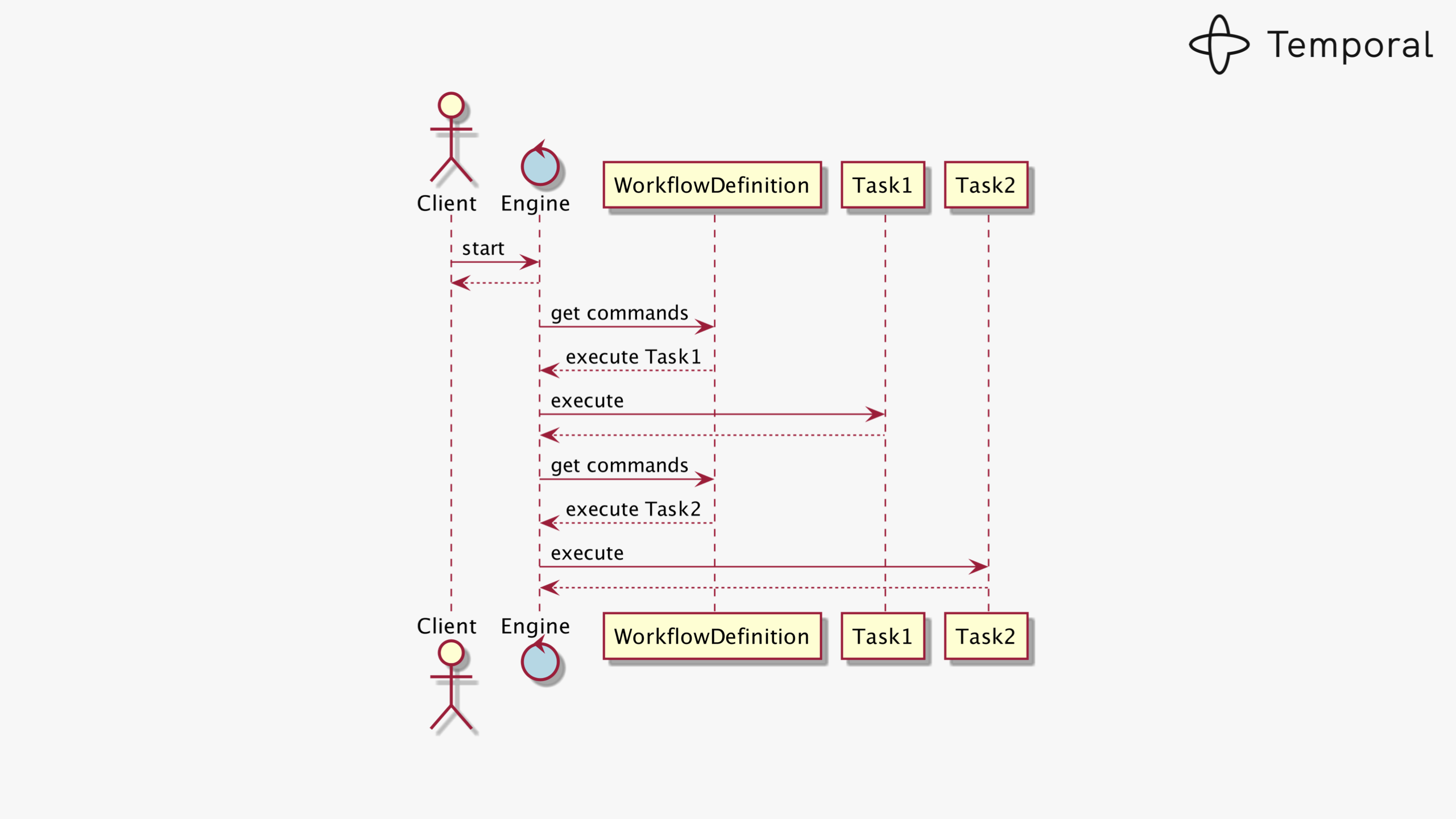
A workflow execution is a deterministic state machine driven by an append-only event history
When a Worker restarts after a crash, it re-fetches the event history and replays the workflow function. Steps that already completed are skipped instantly; execution continues from the last committed state.
Consistency is Non-Negotiable
Every state transition must atomically update the workflow state and enqueue the next task. If either write fails, the system enters an unrecoverable inconsistent state: a phantom task that will never be delivered.
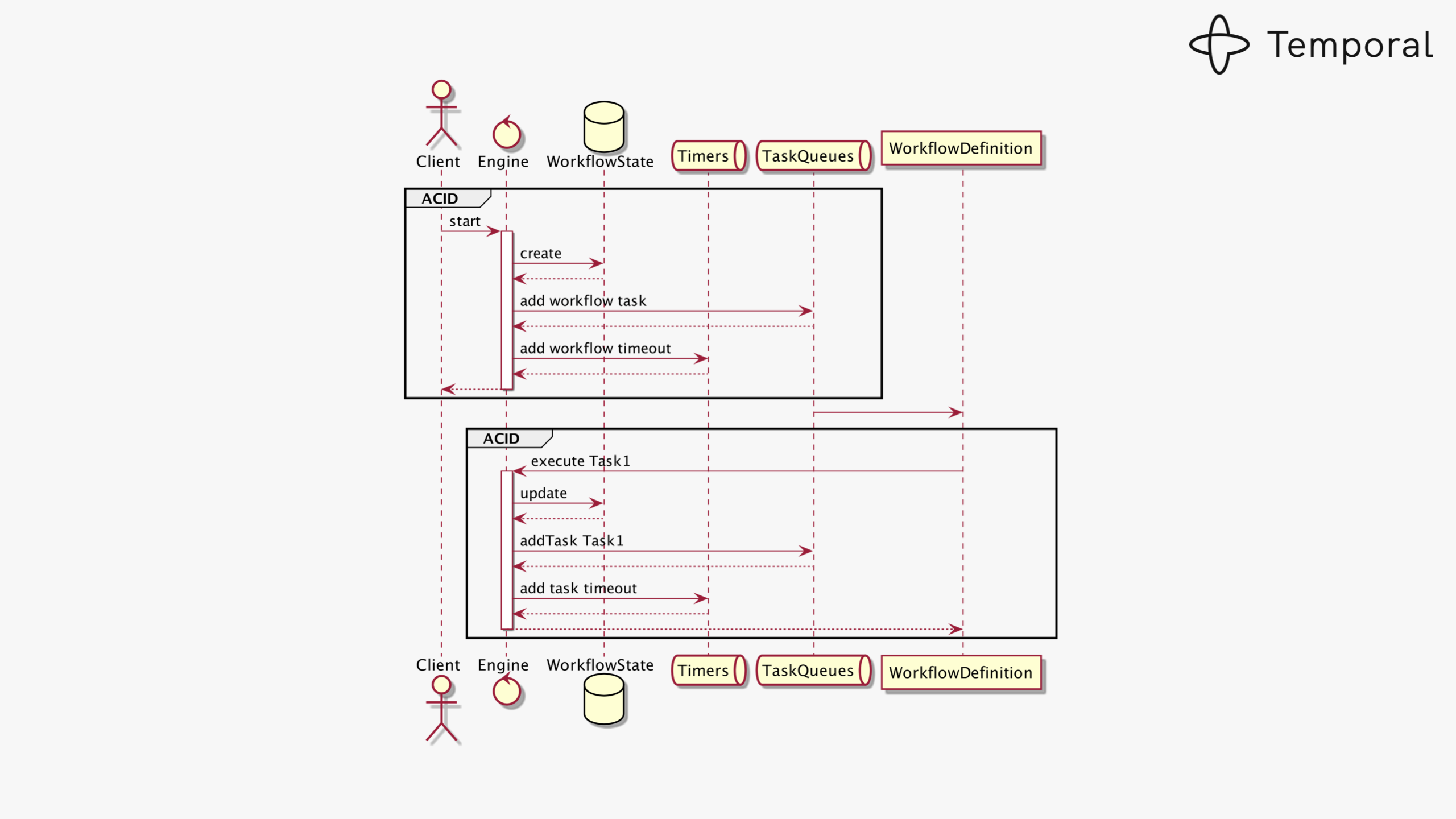
State transitions require atomically updating workflow state and task queue entries in a single transaction
This is why Temporal demands a strongly-consistent relational store with full ACID guarantees. CockroachDB, which provides serializable isolation at any scale, is a natural fit where a single PostgreSQL primary would become a bottleneck.
Visibility: Queryable Workflow Index
In addition to the main persistence store, Temporal maintains a Visibility store, a secondary database optimised for querying workflow executions by status, type, start time, and custom search attributes stored as JSONB.
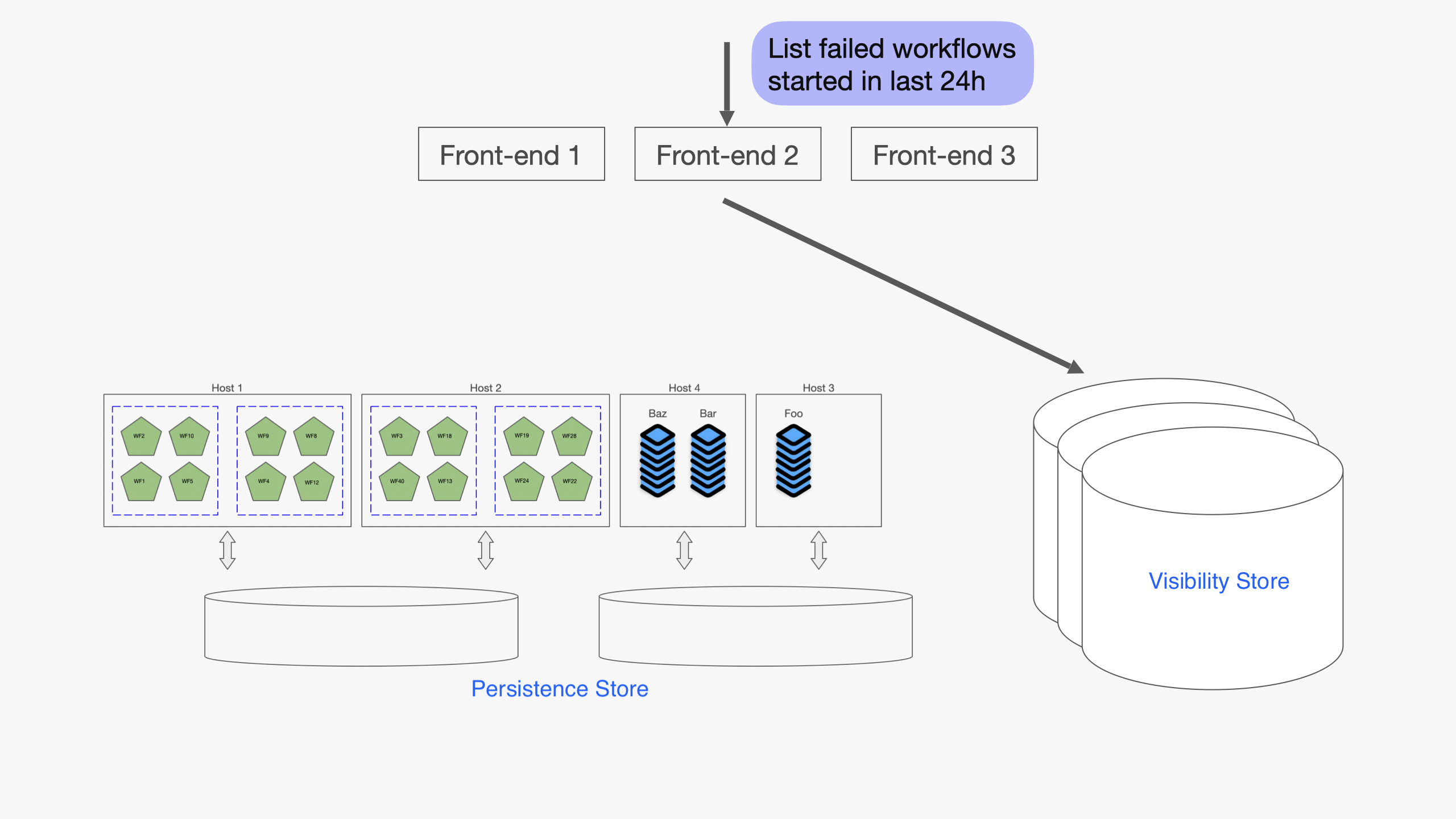
The Visibility store indexes workflow executions for list and filter queries using JSONB search attributes
The visibility schema ships as standard PostgreSQL DDL and works seamlessly when Temporal runs on a single PostgreSQL primary. Distributed SQL databases such as CockroachDB or YugabyteDB, however, do not support every PostgreSQL extension and syntax construct the schema relies on, so the out-of-the-box migration cannot be applied as-is. YugabyteDB has already documented a setup path for running Temporal on their platform. For CockroachDB, the equivalent is to bypass temporal-sql-tool for the visibility database and apply a hand-crafted compatible schema directly with psql (see Step 3 below).
Full Cluster Architecture with CockroachDB
A Temporal cluster consists of four independently scalable stateless services fronting two durable storage tiers. When CockroachDB backs both stores, the entire persistence tier gains distributed replication, automatic failover, and horizontal scalability, all transparent to Temporal’s services.
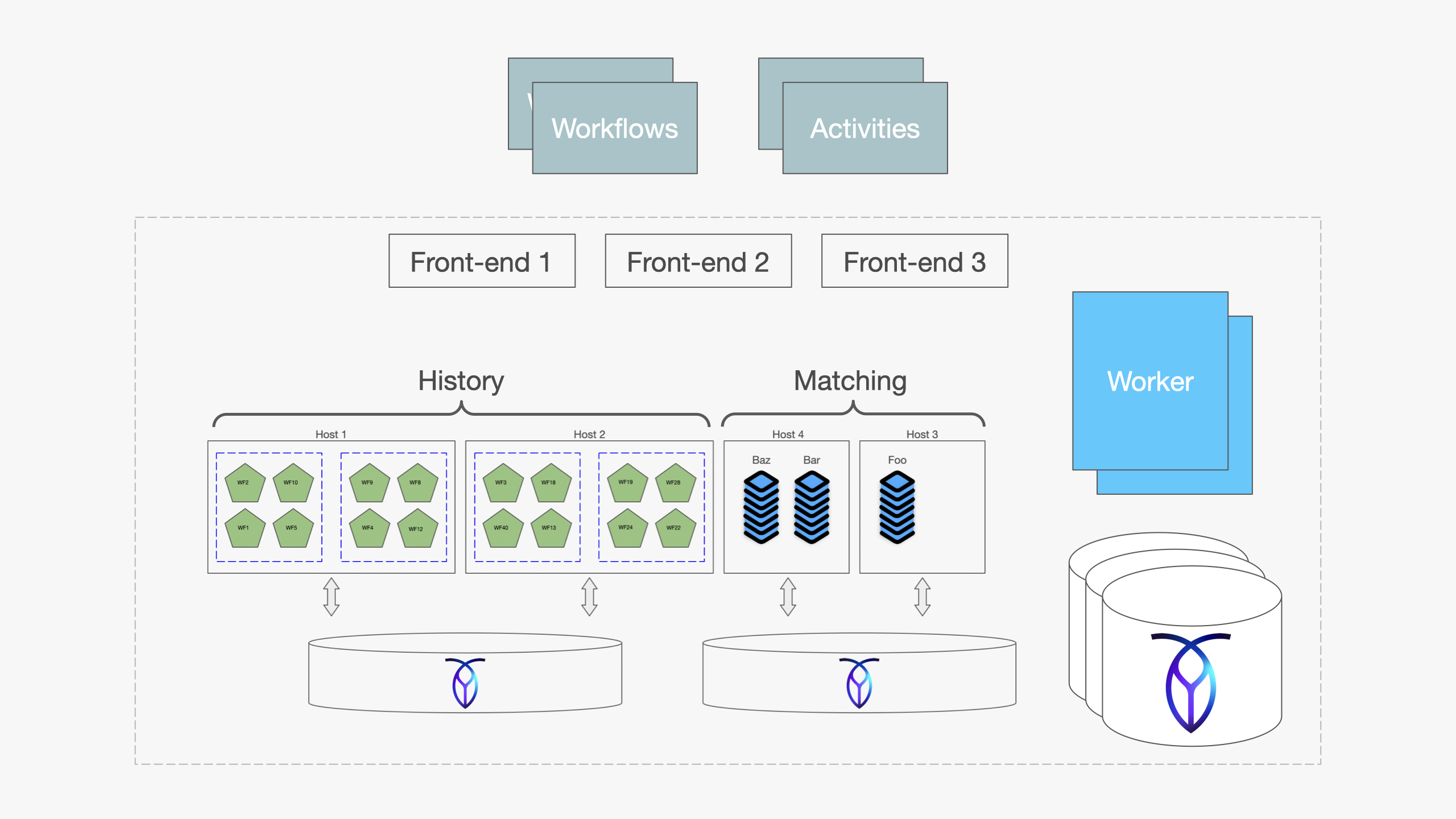
Temporal cluster with CockroachDB as the persistence and visibility backend
| Service | Role |
|---|---|
| Frontend | gRPC gateway; routes client requests to the correct History shard |
| History | Owns workflow state machines; processes commands and records events |
| Matching | Manages task queues; dispatches tasks to available Workers |
| Worker | Runs internal system workflows (replication, archival, cleanup) |
| Persistence Store (CockroachDB) | Event histories, timers, transfer queues: strong consistency, distributed writes |
| Visibility Store (CockroachDB) | Queryable execution index: CREATE INVERTED INDEX replaces PostgreSQL-specific GIN constructs |
Why CockroachDB for Temporal?
Temporal officially supports PostgreSQL, MySQL, SQLite, and Cassandra. CockroachDB is a natural fit for the persistence store because it brings:
- Distributed, strongly-consistent SQL: the same ACID guarantees PostgreSQL provides, at any scale
- Active-active multi-region: Temporal history shards can be distributed across regions without manual replication
- Automatic failover: node failures are transparent to Temporal’s services
- Horizontal scalability: scale reads and writes without sharding logic in the application
- PostgreSQL wire protocol: Temporal’s existing
postgres12plugin works directly
| Capability | CockroachDB Contribution |
|---|---|
| Serializable isolation | No lost updates or phantom reads under concurrent workflow execution |
| Multi-region replication | History shards durable across data-center failures without manual failover |
| Horizontal scalability | Add nodes to absorb more concurrent workflows without re-sharding |
| Automatic failover | Node failures transparent to all four Temporal services |
| PostgreSQL compatibility | Zero application code changes; postgres12 plugin works directly |
CockroachDB connects to Temporal through the standard postgres12 plugin, requiring no changes to Temporal’s application code. The only additional deployment step is applying a CockroachDB-compatible visibility schema that resolves a small number of PostgreSQL-specific constructs not supported by CockroachDB.
Deploying Temporal on CockroachDB
Prerequisites: Install required tools
All binaries below are standalone and require no package manager. Pick the version that matches your OS and architecture.
Temporal server and SQL tool
Download the Temporal server tarball from the GitHub releases page. The tarball contains temporal-server, temporal-sql-tool, and tdbg:
VERSION="1.30.4"
curl -L -o temporal.tar.gz \
  "https://github.com/temporalio/temporal/releases/download/v${VERSION}/temporal_${VERSION}_linux_amd64.tar.gz"
tar -xzf temporal.tar.gz
chmod +x temporal-server temporal-sql-tool tdbg
sudo mv temporal-server temporal-sql-tool tdbg /usr/local/bin/
On macOS ARM64 replace
linux_amd64withdarwin_arm64.
Temporal CLI
The temporal CLI is used to manage namespaces, start workflows, and query cluster health. Download it separately:
CLI_VERSION="1.3.0"
curl -L -o temporal.tar.gz \
  "https://github.com/temporalio/cli/releases/download/v${CLI_VERSION}/temporal_cli_${CLI_VERSION}_linux_amd64.tar.gz"
tar -xzf temporal.tar.gz
chmod +x temporal
sudo mv temporal /usr/local/bin/
Temporal Web UI (optional)
The standalone UI server connects to your Temporal frontend over gRPC and serves the browser dashboard:
UI_VERSION="2.49.1"
curl -L -o temporal-ui.tar.gz \
  "https://github.com/temporalio/ui-server/releases/download/v${UI_VERSION}/ui-server_${UI_VERSION}_linux_amd64.tar.gz"
tar -xzf temporal-ui.tar.gz
chmod +x ui-server
sudo mv ui-server /usr/local/bin/temporal-ui-server
Create a minimal config file and start it:
mkdir -p ~/temporal-ui/config
cat > ~/temporal-ui/config/development.yaml <<EOF
temporalGrpcAddress: "localhost:7233"
host: "0.0.0.0"
port: 8080
enableUi: true
EOF

temporal-ui-server --root ~/temporal-ui start
The UI is then available at http://localhost:8080.
Omes: Load Testing Tool
Omes requires Go 1.21+. Install Go first if needed:
# macOS
brew install go

# Linux (adjust version as needed)
curl -L https://go.dev/dl/go1.21.0.linux-amd64.tar.gz | sudo tar -C /usr/local -xzf -
export PATH=$PATH:/usr/local/go/bin
Then clone and build Omes:
git clone https://github.com/temporalio/omes.git
cd omes
go build -o omes ./cmd/main.go
sudo mv omes /usr/local/bin/
psql client
psql is used to apply the CockroachDB-compatible visibility schema directly. It ships with PostgreSQL client tools:
# macOS
brew install libpq && brew link --force libpq

# Debian / Ubuntu
sudo apt-get install -y postgresql-client

# RHEL / Amazon Linux
sudo yum install -y postgresql
Step 1: Provision CockroachDB databases and user
CREATE DATABASE temporal;
CREATE DATABASE temporal_visibility;
CREATE USER temporal WITH PASSWORD 'your-password';
GRANT ALL ON DATABASE temporal TO temporal;
GRANT ALL ON DATABASE temporal_visibility TO temporal;
Set the same password as the TEMPORAL_DB_PASSWORD environment variable used in Steps 2 and 4.
Step 2: Initialize the persistence schema
The main schema works with CockroachDB out of the box via Temporal’s SQL tool. Download temporal-sql-tool from the Temporal GitHub releases alongside temporal-server. The schema files are in the source tarball under schema/postgresql/v12/temporal/versioned/.
Important: pass hostname and port as separate flags (
--ep <host> --port 26257).temporal-sql-toolsupports multiple database backends including MySQL, and its internal port-parsing logic treats a combinedhost:portstring as a MySQL endpoint, silently appending:3306instead of using the port you specified.
temporal-sql-tool \
  --plugin postgres12 \
  --ep "<crdb-host>" \
  --port 26257 \
  --db temporal \
  --user temporal \
  --tls \
  --tls-ca-file /certs/ca.crt \
  --tls-cert-file /certs/client.temporal.crt \
  --tls-key-file /certs/client.temporal.key \
  setup-schema -v 0.0

temporal-sql-tool \
  --plugin postgres12 \
  --ep "<crdb-host>" \
  --port 26257 \
  --db temporal \
  --user temporal \
  --tls \
  --tls-ca-file /certs/ca.crt \
  --tls-cert-file /certs/client.temporal.crt \
  --tls-key-file /certs/client.temporal.key \
  update-schema -d ./schema/postgresql/v12/temporal/versioned
Step 3: Fix the visibility schema for CockroachDB
This step requires bypassing
temporal-sql-toolentirely for the visibility database. Migrationv1.2(advanced_visibility.sql) introduces four CockroachDB incompatibilities that cause the tool to hard-fail. Applying a hand-crafted schema directly withpsqlis the correct path.
btree_gin is indeed one of the incompatibilities, as CockroachDB does not support that extension. It is worth noting that the incompatibility surfaces in migration v1.2, not v1.1 as some earlier guides suggest, and btree_gin is not the only obstacle. The extension call is wrapped inside a DO LANGUAGE 'plpgsql' anonymous code block; since CockroachDB does not support anonymous code blocks, the failure occurs at the DO statement rather than at the extension lookup. Three additional incompatibilities follow in the same file.
The four incompatibilities, all in schema/postgresql/v12/visibility/versioned/v1.2/advanced_visibility.sql:
| Incompatibility | Root cause | Fix |
|---|---|---|
DO LANGUAGE 'plpgsql' $$...$$ |
Anonymous code blocks are not supported in CockroachDB | Remove entirely; no extension setup is needed |
TSVECTOR column type |
Not supported in CockroachDB | Replace with VARCHAR(4096) |
(s::timestamptz AT TIME ZONE 'UTC') in STORED computed columns |
Context-dependent cast; CockroachDB rejects it in stored computed columns | Use parse_timestamp(s) instead |
USING GIN (namespace_id, col jsonb_path_ops) |
Multi-column GIN with jsonb_path_ops not supported |
Use CREATE INVERTED INDEX (col) on the single JSONB column |
The schema must also cover all migrations through v1.13, which Temporal’s startup version check requires. Save the following as crdb_visibility_schema.sql and apply it directly:
-- Schema version tracking tables (required for Temporal's startup version check)
CREATE TABLE IF NOT EXISTS schema_version (
  version_partition       INT NOT NULL,
  db_name                 VARCHAR(255) NOT NULL,
  creation_time           TIMESTAMP,
  curr_version            VARCHAR(64),
  min_compatible_version  VARCHAR(64),
  PRIMARY KEY (version_partition, db_name)
);

CREATE TABLE IF NOT EXISTS schema_update_history (
  version_partition INT NOT NULL,
  year              INT NOT NULL,
  month             INT NOT NULL,
  update_time       TIMESTAMP,
  description       VARCHAR(255),
  manifest_md5      VARCHAR(64),
  new_version       VARCHAR(64),
  old_version       VARCHAR(64),
  PRIMARY KEY (version_partition, year, month, update_time)
);

-- executions_visibility with all columns through v1.13
-- TSVECTOR -> VARCHAR; parse_timestamp() replaces ::timestamp; no btree_gin needed
CREATE TABLE executions_visibility (
  namespace_id         CHAR(64)      NOT NULL,
  run_id               CHAR(64)      NOT NULL,
  start_time           TIMESTAMP     NOT NULL,
  execution_time       TIMESTAMP     NOT NULL,
  workflow_id          VARCHAR(255)  NOT NULL,
  workflow_type_name   VARCHAR(255)  NOT NULL,
  status               INTEGER       NOT NULL,
  close_time           TIMESTAMP     NULL,
  history_length       BIGINT,
  history_size_bytes   BIGINT        NULL,
  execution_duration   BIGINT        NULL,
  state_transition_count BIGINT      NULL,
  memo                 BYTEA,
  encoding             VARCHAR(64)   NOT NULL,
  task_queue           VARCHAR(255)  DEFAULT '' NOT NULL,
  search_attributes    JSONB         NULL,
  parent_workflow_id   VARCHAR(255)  NULL,
  parent_run_id        VARCHAR(255)  NULL,
  root_workflow_id     VARCHAR(255)  NOT NULL DEFAULT '',
  root_run_id          VARCHAR(255)  NOT NULL DEFAULT '',
  _version             BIGINT        NOT NULL DEFAULT 0,

  -- Predefined search attributes (computed from the search_attributes JSONB blob)
  TemporalChangeVersion      JSONB         AS (search_attributes->'TemporalChangeVersion')                                       STORED,
  BinaryChecksums            JSONB         AS (search_attributes->'BinaryChecksums')                                             STORED,
  BuildIds                   JSONB         AS (search_attributes->'BuildIds')                                                     STORED,
  BatcherUser                VARCHAR(255)  AS (search_attributes->>'BatcherUser')                                                STORED,
  TemporalScheduledStartTime TIMESTAMP     AS (parse_timestamp(search_attributes->>'TemporalScheduledStartTime'))                STORED,
  TemporalScheduledById      VARCHAR(255)  AS (search_attributes->>'TemporalScheduledById')                                      STORED,
  TemporalSchedulePaused     BOOLEAN       AS ((search_attributes->'TemporalSchedulePaused')::boolean)                           STORED,
  TemporalNamespaceDivision  VARCHAR(255)  AS (search_attributes->>'TemporalNamespaceDivision')                                  STORED,
  TemporalPauseInfo          JSONB         AS (search_attributes->'TemporalPauseInfo')                                           STORED,
  TemporalWorkerDeploymentVersion    VARCHAR(255)  AS (search_attributes->>'TemporalWorkerDeploymentVersion')                    STORED,
  TemporalWorkflowVersioningBehavior VARCHAR(255)  AS (search_attributes->>'TemporalWorkflowVersioningBehavior')                 STORED,
  TemporalWorkerDeployment           VARCHAR(255)  AS (search_attributes->>'TemporalWorkerDeployment')                           STORED,
  TemporalReportedProblems           JSONB         AS (search_attributes->'TemporalReportedProblems')                            STORED,
  TemporalBool01         BOOLEAN       AS ((search_attributes->'TemporalBool01')::boolean)                                       STORED,
  TemporalBool02         BOOLEAN       AS ((search_attributes->'TemporalBool02')::boolean)                                       STORED,
  TemporalDatetime01     TIMESTAMP     AS (parse_timestamp(search_attributes->>'TemporalDatetime01'))                            STORED,
  TemporalDatetime02     TIMESTAMP     AS (parse_timestamp(search_attributes->>'TemporalDatetime02'))                            STORED,
  TemporalDouble01       DECIMAL(20,5) AS ((search_attributes->'TemporalDouble01')::decimal)                                     STORED,
  TemporalDouble02       DECIMAL(20,5) AS ((search_attributes->'TemporalDouble02')::decimal)                                     STORED,
  TemporalInt01          BIGINT        AS ((search_attributes->'TemporalInt01')::bigint)                                         STORED,
  TemporalInt02          BIGINT        AS ((search_attributes->'TemporalInt02')::bigint)                                         STORED,
  TemporalKeyword01      VARCHAR(255)  AS (search_attributes->>'TemporalKeyword01')                                              STORED,
  TemporalKeyword02      VARCHAR(255)  AS (search_attributes->>'TemporalKeyword02')                                              STORED,
  TemporalKeyword03      VARCHAR(255)  AS (search_attributes->>'TemporalKeyword03')                                              STORED,
  TemporalKeyword04      VARCHAR(255)  AS (search_attributes->>'TemporalKeyword04')                                              STORED,
  TemporalKeywordList01  JSONB         AS (search_attributes->'TemporalKeywordList01')                                           STORED,
  TemporalKeywordList02  JSONB         AS (search_attributes->'TemporalKeywordList02')                                           STORED,
  TemporalLowCardinalityKeyword01 VARCHAR(255) AS (search_attributes->>'TemporalLowCardinalityKeyword01')                        STORED,
  TemporalUsedWorkerDeploymentVersions JSONB   AS (search_attributes->'TemporalUsedWorkerDeploymentVersions')                    STORED,

  -- Pre-allocated custom search attributes
  Bool01     BOOLEAN       AS ((search_attributes->'Bool01')::boolean)      STORED,
  Bool02     BOOLEAN       AS ((search_attributes->'Bool02')::boolean)      STORED,
  Bool03     BOOLEAN       AS ((search_attributes->'Bool03')::boolean)      STORED,
  Datetime01 TIMESTAMP     AS (parse_timestamp(search_attributes->>'Datetime01')) STORED,
  Datetime02 TIMESTAMP     AS (parse_timestamp(search_attributes->>'Datetime02')) STORED,
  Datetime03 TIMESTAMP     AS (parse_timestamp(search_attributes->>'Datetime03')) STORED,
  Double01   DECIMAL(20,5) AS ((search_attributes->'Double01')::decimal)    STORED,
  Double02   DECIMAL(20,5) AS ((search_attributes->'Double02')::decimal)    STORED,
  Double03   DECIMAL(20,5) AS ((search_attributes->'Double03')::decimal)    STORED,
  Int01      BIGINT        AS ((search_attributes->'Int01')::bigint)        STORED,
  Int02      BIGINT        AS ((search_attributes->'Int02')::bigint)        STORED,
  Int03      BIGINT        AS ((search_attributes->'Int03')::bigint)        STORED,
  Keyword01  VARCHAR(255)  AS (search_attributes->>'Keyword01')             STORED,
  Keyword02  VARCHAR(255)  AS (search_attributes->>'Keyword02')             STORED,
  Keyword03  VARCHAR(255)  AS (search_attributes->>'Keyword03')             STORED,
  Keyword04  VARCHAR(255)  AS (search_attributes->>'Keyword04')             STORED,
  Keyword05  VARCHAR(255)  AS (search_attributes->>'Keyword05')             STORED,
  Keyword06  VARCHAR(255)  AS (search_attributes->>'Keyword06')             STORED,
  Keyword07  VARCHAR(255)  AS (search_attributes->>'Keyword07')             STORED,
  Keyword08  VARCHAR(255)  AS (search_attributes->>'Keyword08')             STORED,
  Keyword09  VARCHAR(255)  AS (search_attributes->>'Keyword09')             STORED,
  Keyword10  VARCHAR(255)  AS (search_attributes->>'Keyword10')             STORED,
  Text01     VARCHAR(4096) AS (search_attributes->>'Text01')                STORED,
  Text02     VARCHAR(4096) AS (search_attributes->>'Text02')                STORED,
  Text03     VARCHAR(4096) AS (search_attributes->>'Text03')                STORED,
  KeywordList01 JSONB      AS (search_attributes->'KeywordList01')          STORED,
  KeywordList02 JSONB      AS (search_attributes->'KeywordList02')          STORED,
  KeywordList03 JSONB      AS (search_attributes->'KeywordList03')          STORED,

  PRIMARY KEY (namespace_id, run_id)
);

-- Standard expression indexes (COALESCE open/close window pattern)
CREATE INDEX default_idx           ON executions_visibility (namespace_id, (COALESCE(close_time, '9999-12-31 23:59:59')) DESC, start_time DESC, run_id);
CREATE INDEX by_execution_time     ON executions_visibility (namespace_id, execution_time,     (COALESCE(close_time, '9999-12-31 23:59:59')) DESC, start_time DESC, run_id);
CREATE INDEX by_workflow_id        ON executions_visibility (namespace_id, workflow_id,        (COALESCE(close_time, '9999-12-31 23:59:59')) DESC, start_time DESC, run_id);
CREATE INDEX by_workflow_type      ON executions_visibility (namespace_id, workflow_type_name, (COALESCE(close_time, '9999-12-31 23:59:59')) DESC, start_time DESC, run_id);
CREATE INDEX by_status             ON executions_visibility (namespace_id, status,             (COALESCE(close_time, '9999-12-31 23:59:59')) DESC, start_time DESC, run_id);
CREATE INDEX by_history_length     ON executions_visibility (namespace_id, history_length,     (COALESCE(close_time, '9999-12-31 23:59:59')) DESC, start_time DESC, run_id);
CREATE INDEX by_history_size_bytes ON executions_visibility (namespace_id, history_size_bytes, (COALESCE(close_time, '9999-12-31 23:59:59')) DESC, start_time DESC, run_id);
CREATE INDEX by_execution_duration ON executions_visibility (namespace_id, execution_duration, (COALESCE(close_time, '9999-12-31 23:59:59')) DESC, start_time DESC, run_id);
CREATE INDEX by_state_transition_count ON executions_visibility (namespace_id, state_transition_count, (COALESCE(close_time, '9999-12-31 23:59:59')) DESC, start_time DESC, run_id);
CREATE INDEX by_task_queue         ON executions_visibility (namespace_id, task_queue,         (COALESCE(close_time, '9999-12-31 23:59:59')) DESC, start_time DESC, run_id);
CREATE INDEX by_parent_workflow_id ON executions_visibility (namespace_id, parent_workflow_id, (COALESCE(close_time, '9999-12-31 23:59:59')) DESC, start_time DESC, run_id);
CREATE INDEX by_parent_run_id      ON executions_visibility (namespace_id, parent_run_id,      (COALESCE(close_time, '9999-12-31 23:59:59')) DESC, start_time DESC, run_id);
CREATE INDEX by_root_workflow_id   ON executions_visibility (namespace_id, root_workflow_id,   (COALESCE(close_time, '9999-12-31 23:59:59')) DESC, start_time DESC, run_id);
CREATE INDEX by_root_run_id        ON executions_visibility (namespace_id, root_run_id,        (COALESCE(close_time, '9999-12-31 23:59:59')) DESC, start_time DESC, run_id);
CREATE INDEX by_batcher_user       ON executions_visibility (namespace_id, BatcherUser,        (COALESCE(close_time, '9999-12-31 23:59:59')) DESC, start_time DESC, run_id);
CREATE INDEX by_temporal_scheduled_start_time ON executions_visibility (namespace_id, TemporalScheduledStartTime, (COALESCE(close_time, '9999-12-31 23:59:59')) DESC, start_time DESC, run_id);
CREATE INDEX by_temporal_scheduled_by_id      ON executions_visibility (namespace_id, TemporalScheduledById,     (COALESCE(close_time, '9999-12-31 23:59:59')) DESC, start_time DESC, run_id);
CREATE INDEX by_temporal_schedule_paused      ON executions_visibility (namespace_id, TemporalSchedulePaused,    (COALESCE(close_time, '9999-12-31 23:59:59')) DESC, start_time DESC, run_id);
CREATE INDEX by_temporal_namespace_division   ON executions_visibility (namespace_id, TemporalNamespaceDivision, (COALESCE(close_time, '9999-12-31 23:59:59')) DESC, start_time DESC, run_id);
CREATE INDEX by_temporal_worker_deployment_version ON executions_visibility (namespace_id, TemporalWorkerDeploymentVersion, (COALESCE(close_time, '9999-12-31 23:59:59')) DESC, start_time DESC, run_id);
CREATE INDEX by_temporal_workflow_versioning_behavior ON executions_visibility (namespace_id, TemporalWorkflowVersioningBehavior, (COALESCE(close_time, '9999-12-31 23:59:59')) DESC, start_time DESC, run_id);
CREATE INDEX by_temporal_worker_deployment ON executions_visibility (namespace_id, TemporalWorkerDeployment, (COALESCE(close_time, '9999-12-31 23:59:59')) DESC, start_time DESC, run_id);
CREATE INDEX by_temporal_bool_01     ON executions_visibility (namespace_id, TemporalBool01,   (COALESCE(close_time, '9999-12-31 23:59:59')) DESC, start_time DESC, run_id);
CREATE INDEX by_temporal_bool_02     ON executions_visibility (namespace_id, TemporalBool02,   (COALESCE(close_time, '9999-12-31 23:59:59')) DESC, start_time DESC, run_id);
CREATE INDEX by_temporal_datetime_01 ON executions_visibility (namespace_id, TemporalDatetime01, (COALESCE(close_time, '9999-12-31 23:59:59')) DESC, start_time DESC, run_id);
CREATE INDEX by_temporal_datetime_02 ON executions_visibility (namespace_id, TemporalDatetime02, (COALESCE(close_time, '9999-12-31 23:59:59')) DESC, start_time DESC, run_id);
CREATE INDEX by_temporal_double_01   ON executions_visibility (namespace_id, TemporalDouble01,  (COALESCE(close_time, '9999-12-31 23:59:59')) DESC, start_time DESC, run_id);
CREATE INDEX by_temporal_double_02   ON executions_visibility (namespace_id, TemporalDouble02,  (COALESCE(close_time, '9999-12-31 23:59:59')) DESC, start_time DESC, run_id);
CREATE INDEX by_temporal_int_01      ON executions_visibility (namespace_id, TemporalInt01,     (COALESCE(close_time, '9999-12-31 23:59:59')) DESC, start_time DESC, run_id);
CREATE INDEX by_temporal_int_02      ON executions_visibility (namespace_id, TemporalInt02,     (COALESCE(close_time, '9999-12-31 23:59:59')) DESC, start_time DESC, run_id);
CREATE INDEX by_temporal_keyword_01  ON executions_visibility (namespace_id, TemporalKeyword01, (COALESCE(close_time, '9999-12-31 23:59:59')) DESC, start_time DESC, run_id);
CREATE INDEX by_temporal_keyword_02  ON executions_visibility (namespace_id, TemporalKeyword02, (COALESCE(close_time, '9999-12-31 23:59:59')) DESC, start_time DESC, run_id);
CREATE INDEX by_temporal_keyword_03  ON executions_visibility (namespace_id, TemporalKeyword03, (COALESCE(close_time, '9999-12-31 23:59:59')) DESC, start_time DESC, run_id);
CREATE INDEX by_temporal_keyword_04  ON executions_visibility (namespace_id, TemporalKeyword04, (COALESCE(close_time, '9999-12-31 23:59:59')) DESC, start_time DESC, run_id);
CREATE INDEX by_temporal_low_cardinality_keyword_01 ON executions_visibility (namespace_id, TemporalLowCardinalityKeyword01, (COALESCE(close_time, '9999-12-31 23:59:59')) DESC, start_time DESC, run_id);
CREATE INDEX by_bool_01  ON executions_visibility (namespace_id, Bool01,  (COALESCE(close_time, '9999-12-31 23:59:59')) DESC, start_time DESC, run_id);
CREATE INDEX by_bool_02  ON executions_visibility (namespace_id, Bool02,  (COALESCE(close_time, '9999-12-31 23:59:59')) DESC, start_time DESC, run_id);
CREATE INDEX by_bool_03  ON executions_visibility (namespace_id, Bool03,  (COALESCE(close_time, '9999-12-31 23:59:59')) DESC, start_time DESC, run_id);
CREATE INDEX by_datetime_01 ON executions_visibility (namespace_id, Datetime01, (COALESCE(close_time, '9999-12-31 23:59:59')) DESC, start_time DESC, run_id);
CREATE INDEX by_datetime_02 ON executions_visibility (namespace_id, Datetime02, (COALESCE(close_time, '9999-12-31 23:59:59')) DESC, start_time DESC, run_id);
CREATE INDEX by_datetime_03 ON executions_visibility (namespace_id, Datetime03, (COALESCE(close_time, '9999-12-31 23:59:59')) DESC, start_time DESC, run_id);
CREATE INDEX by_double_01   ON executions_visibility (namespace_id, Double01,   (COALESCE(close_time, '9999-12-31 23:59:59')) DESC, start_time DESC, run_id);
CREATE INDEX by_double_02   ON executions_visibility (namespace_id, Double02,   (COALESCE(close_time, '9999-12-31 23:59:59')) DESC, start_time DESC, run_id);
CREATE INDEX by_double_03   ON executions_visibility (namespace_id, Double03,   (COALESCE(close_time, '9999-12-31 23:59:59')) DESC, start_time DESC, run_id);
CREATE INDEX by_int_01      ON executions_visibility (namespace_id, Int01,      (COALESCE(close_time, '9999-12-31 23:59:59')) DESC, start_time DESC, run_id);
CREATE INDEX by_int_02      ON executions_visibility (namespace_id, Int02,      (COALESCE(close_time, '9999-12-31 23:59:59')) DESC, start_time DESC, run_id);
CREATE INDEX by_int_03      ON executions_visibility (namespace_id, Int03,      (COALESCE(close_time, '9999-12-31 23:59:59')) DESC, start_time DESC, run_id);
CREATE INDEX by_keyword_01  ON executions_visibility (namespace_id, Keyword01,  (COALESCE(close_time, '9999-12-31 23:59:59')) DESC, start_time DESC, run_id);
CREATE INDEX by_keyword_02  ON executions_visibility (namespace_id, Keyword02,  (COALESCE(close_time, '9999-12-31 23:59:59')) DESC, start_time DESC, run_id);
CREATE INDEX by_keyword_03  ON executions_visibility (namespace_id, Keyword03,  (COALESCE(close_time, '9999-12-31 23:59:59')) DESC, start_time DESC, run_id);
CREATE INDEX by_keyword_04  ON executions_visibility (namespace_id, Keyword04,  (COALESCE(close_time, '9999-12-31 23:59:59')) DESC, start_time DESC, run_id);
CREATE INDEX by_keyword_05  ON executions_visibility (namespace_id, Keyword05,  (COALESCE(close_time, '9999-12-31 23:59:59')) DESC, start_time DESC, run_id);
CREATE INDEX by_keyword_06  ON executions_visibility (namespace_id, Keyword06,  (COALESCE(close_time, '9999-12-31 23:59:59')) DESC, start_time DESC, run_id);
CREATE INDEX by_keyword_07  ON executions_visibility (namespace_id, Keyword07,  (COALESCE(close_time, '9999-12-31 23:59:59')) DESC, start_time DESC, run_id);
CREATE INDEX by_keyword_08  ON executions_visibility (namespace_id, Keyword08,  (COALESCE(close_time, '9999-12-31 23:59:59')) DESC, start_time DESC, run_id);
CREATE INDEX by_keyword_09  ON executions_visibility (namespace_id, Keyword09,  (COALESCE(close_time, '9999-12-31 23:59:59')) DESC, start_time DESC, run_id);
CREATE INDEX by_keyword_10  ON executions_visibility (namespace_id, Keyword10,  (COALESCE(close_time, '9999-12-31 23:59:59')) DESC, start_time DESC, run_id);

-- CockroachDB inverted indexes replace multi-column GIN (namespace_id, col jsonb_path_ops)
CREATE INVERTED INDEX by_temporal_change_version     ON executions_visibility (TemporalChangeVersion);
CREATE INVERTED INDEX by_binary_checksums            ON executions_visibility (BinaryChecksums);
CREATE INVERTED INDEX by_build_ids                   ON executions_visibility (BuildIds);
CREATE INVERTED INDEX by_temporal_pause_info         ON executions_visibility (TemporalPauseInfo);
CREATE INVERTED INDEX by_temporal_reported_problems  ON executions_visibility (TemporalReportedProblems);
CREATE INVERTED INDEX by_temporal_keyword_list_01    ON executions_visibility (TemporalKeywordList01);
CREATE INVERTED INDEX by_temporal_keyword_list_02    ON executions_visibility (TemporalKeywordList02);
CREATE INVERTED INDEX by_keyword_list_01             ON executions_visibility (KeywordList01);
CREATE INVERTED INDEX by_keyword_list_02             ON executions_visibility (KeywordList02);
CREATE INVERTED INDEX by_keyword_list_03             ON executions_visibility (KeywordList03);
CREATE INVERTED INDEX by_used_deployment_versions    ON executions_visibility (TemporalUsedWorkerDeploymentVersions);

-- Set the schema version so Temporal's startup compatibility check passes
INSERT INTO schema_version (version_partition, db_name, creation_time, curr_version, min_compatible_version)
VALUES (0, 'temporal_visibility', now(), '1.13', '0.1')
ON CONFLICT DO NOTHING;
Apply it with psql (no cockroach CLI required):
PGPASSWORD="${TEMPORAL_DB_PASSWORD}" psql \
  "postgresql://temporal@<crdb-host>:26257/temporal_visibility?sslmode=verify-full&sslrootcert=/certs/ca.crt&sslcert=/certs/client.temporal.crt&sslkey=/certs/client.temporal.key" \
  --file ./crdb_visibility_schema.sql
Step 4: Configure and start Temporal server
Save the following as base.yaml. The config must be in a file; the --config-file flag takes an absolute or cwd-relative path:
log:
  stdout: true
  level: "info"

persistence:
  defaultStore: crdb-default
  visibilityStore: crdb-visibility
  numHistoryShards: 4
  datastores:
    crdb-default:
      sql:
        pluginName: "postgres12"
        databaseName: "temporal"
        connectAddr: "<crdb-host>:26257"
        connectProtocol: "tcp"
        user: "temporal"
        password: "${TEMPORAL_DB_PASSWORD}"
        maxConns: 20
        maxIdleConns: 20
        maxConnLifetime: "1h"
        tls:
          enabled: true
          caFile: "/certs/ca.crt"
          certFile: "/certs/client.temporal.crt"
          keyFile: "/certs/client.temporal.key"
          serverName: "<crdb-host>"
    crdb-visibility:
      sql:
        pluginName: "postgres12"
        databaseName: "temporal_visibility"
        connectAddr: "<crdb-host>:26257"
        connectProtocol: "tcp"
        user: "temporal"
        password: "${TEMPORAL_DB_PASSWORD}"
        maxConns: 10
        maxIdleConns: 10
        maxConnLifetime: "1h"
        tls:
          enabled: true
          caFile: "/certs/ca.crt"
          certFile: "/certs/client.temporal.crt"
          keyFile: "/certs/client.temporal.key"
          serverName: "<crdb-host>"

global:
  membership:
    maxJoinDuration: 30s
    broadcastAddress: "127.0.0.1"

services:
  frontend:
    rpc:
      grpcPort: 7233
      membershipPort: 6933
      bindOnLocalHost: true
  matching:
    rpc:
      grpcPort: 7235
      membershipPort: 6935
      bindOnLocalHost: true
  history:
    rpc:
      grpcPort: 7234
      membershipPort: 6934
      bindOnLocalHost: true
  worker:
    rpc:
      grpcPort: 7239
      membershipPort: 6939
      bindOnLocalHost: true

clusterMetadata:
  enableGlobalNamespace: false
  failoverVersionIncrement: 10
  masterClusterName: "active"
  currentClusterName: "active"
  clusterInformation:
    active:
      enabled: true
      initialFailoverVersion: 1
      rpcAddress: "127.0.0.1:7233"

dcRedirectionPolicy:
  policy: "noop"

archival:
  history:
    state: "disabled"
  visibility:
    state: "disabled"

namespaceDefaults:
  archival:
    history:
      state: "disabled"
    visibility:
      state: "disabled"
Start the server with --allow-no-auth (required when no authorizer is configured):
temporal-server --config-file ./base.yaml --allow-no-auth start
Step 5: Bootstrap the cluster
Once the server is running, create the default namespace and verify the cluster:
# Create the application namespace
temporal --address localhost:7233 operator namespace create default

# Confirm the cluster is healthy
temporal --address localhost:7233 operator cluster health

# List internal system workflows to confirm the visibility store is connected
temporal --address localhost:7233 -n temporal-system workflow list
You should see SERVING from the health check and two running system workflows (temporal-sys-history-scanner and temporal-sys-tq-scanner) in the list output.
Step 6: Write your first durable AI agent workflow
The following agent loop retrieves context, calls an LLM, and writes the result to a database. Each step is an Activity: it executes exactly once even if the process crashes between steps. An LLM call that costs money is never re-issued after it succeeds.
from temporalio import workflow, activity
from temporalio.client import Client
from temporalio.worker import Worker
from temporalio.common import RetryPolicy
from datetime import timedelta

@activity.defn
async def retrieve_context(task: str) -> str:
    """Query a vector store for relevant context."""
    return await vector_store.search(task)

@activity.defn
async def call_llm(context: str) -> str:
    """Call the LLM: billed once, never re-executed on retry."""
    return await llm_client.complete(f"Given this context: {context}, respond.")

@activity.defn
async def request_human_approval(response: str) -> bool:
    """Write pending approval to DB; the agent can wait days here."""
    return await approvals_db.create_pending(response)

@activity.defn
async def write_final_result(result: str) -> None:
    """Persist the approved result: exactly once."""
    await results_db.insert(result)

@workflow.defn
class AICockroachAgentWorkflow:
    @workflow.run
    async def run(self, task: str) -> str:
        # Step 1: retrieve context (retries safely, idempotent)
        context = await workflow.execute_activity(
            retrieve_context, task,
            start_to_close_timeout=timedelta(minutes=2),
        )
        # Step 2: LLM call (exactly once; no double billing)
        response = await workflow.execute_activity(
            call_llm, context,
            start_to_close_timeout=timedelta(minutes=5),
            retry_policy=RetryPolicy(maximum_attempts=3),
        )
        # Step 3: human-in-the-loop (agent sleeps until approved, days if needed)
        approved = await workflow.execute_activity(
            request_human_approval, response,
            start_to_close_timeout=timedelta(days=7),
        )
        # Step 4: persist result (idempotent write, exactly once)
        if approved:
            await workflow.execute_activity(
                write_final_result, response,
                start_to_close_timeout=timedelta(seconds=30),
            )
        return response
Load and Performance Testing
Benchmarking with Omes
Omes is Temporal’s official load-testing tool (the successor to the deprecated Maru). It drives configurable volumes of workflows and activities against a live cluster and reports throughput, latency, and error rates. Against a CockroachDB backend it lets you observe how the persistence tier behaves as concurrency grows.
Build Omes from source and run the throughput_stress scenario:
git clone https://github.com/temporalio/omes.git
cd omes

# Register the custom search attribute Omes requires
temporal operator search-attribute create \
  --namespace default \
  --name OmesExecutionID \
  --type Keyword

# Run: 50 concurrent workflows, 5-minute duration
go run ./cmd/main.go run-scenario-with-worker \
  --scenario throughput_stress \
  --language go \
  --server-address localhost:7233 \
  --namespace default \
  --duration 5m \
  --max-concurrent 50
Other useful scenarios:
| Scenario | What it tests |
|---|---|
workflow_with_single_noop_activity |
Minimal round-trip: one workflow, one no-op activity |
throughput_stress |
Sustained write throughput to the persistence store |
state_transitions_steady |
Steady-state state-transition rate; use --option state-transitions-per-second=N |
ebb_and_flow |
Oscillating backlog between min and max concurrent workflows |
Co-location matters. Omes uses Temporal’s Workflow Update API internally, which requires sub-second round-trips between the client, server, and persistence store. Run Omes from a machine in the same datacenter or VPC as your CockroachDB cluster. Running against a remote CockroachDB over a WAN connection inflates every write operation (typical p50 rises to 3–6 seconds instead of <100 ms), which causes Omes’ internal update timeouts to fire before scenarios complete.
For a quick persistence latency baseline that works over any connection, use the Temporal Go SDK directly to measure raw StartWorkflowExecution throughput:
package main

import (
    "context"
    "fmt"
    "sort"
    "sync"
    "time"
    "go.temporal.io/sdk/client"
)

func main() {
    c, _ := client.Dial(client.Options{HostPort: "localhost:7233", Namespace: "default"})
    defer c.Close()

    const total, concurrency = 20, 3
    latencies := make([]time.Duration, 0, total)
    var mu sync.Mutex
    var wg sync.WaitGroup
    sem := make(chan struct{}, concurrency)

    t0 := time.Now()
    for i := 0; i < total; i++ {
        wg.Add(1); sem <- struct{}{}
        go func(i int) {
            defer wg.Done(); defer func() { <-sem }()
            start := time.Now()
            c.ExecuteWorkflow(context.Background(), client.StartWorkflowOptions{
                ID: fmt.Sprintf("bench-%d-%d", time.Now().UnixMicro(), i),
                TaskQueue: "bench-queue",
            }, "BenchWorkflow", i)
            mu.Lock(); latencies = append(latencies, time.Since(start)); mu.Unlock()
        }(i)
    }
    wg.Wait()
    elapsed := time.Since(t0)

    sort.Slice(latencies, func(i, j int) bool { return latencies[i] < latencies[j] })
    fmt.Printf("Throughput: %.1f/sec | p50: %v | p95: %v\n",
        float64(len(latencies))/elapsed.Seconds(),
        latencies[len(latencies)*50/100].Round(time.Millisecond),
        latencies[len(latencies)*95/100].Round(time.Millisecond))
}
With this setup you can:
- Measure workflow throughput: workflows started per second at varying concurrency levels
- Observe persistence latency: p50/p95 latency directly reflects CockroachDB write performance; a co-located CockroachDB cluster typically delivers p50 <100 ms, while a remote cluster over a WAN shows 3–6 s per write
- Validate recovery behavior: kill a CockroachDB node mid-run and confirm that in-flight workflows resume automatically once the cluster re-elects a leaseholder, with no manual intervention and no workflow loss
Observability
Two dashboards give complementary views of the same load:
Temporal Web UI (http://localhost:8080 with the default Docker setup, or the UI endpoint of your deployment) lets you inspect individual workflow executions in real time: event history, activity status, retry counts, and current task queue depth. During an Omes run you can watch the open-execution count climb and fall, and drill into any failed workflow to see exactly which activity timed out.
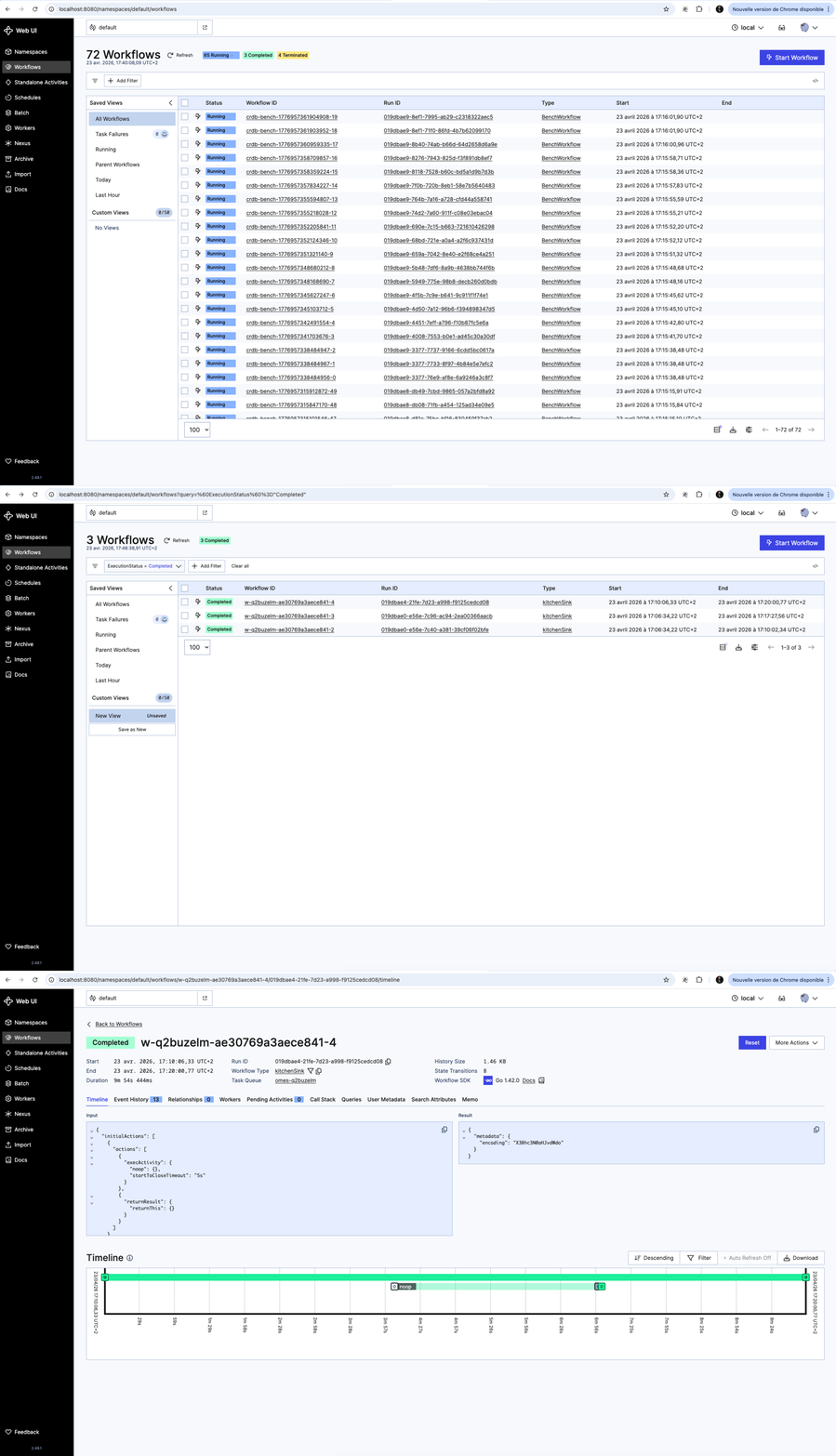
Temporal Web UI: 72 BenchWorkflow executions running against CockroachDB; workflows transition to completed and the UI scrolls into a finished execution’s event history
CockroachDB Admin Console (http://<crdb-host>:8080) exposes the database-level picture:
| Panel | What to watch |
|---|---|
| SQL Activity | Queries per second, p50/p99 latency; high latency on INSERT INTO executions signals write contention |
| Ranges | Distribution of data ranges across nodes; an uneven distribution means one node is a hotspot for history-shard writes |
| Node Map | Per-node CPU, IOPS, and network; confirm no single node is saturated while others are idle |
The combination gives you the full picture: Temporal tells you which workflows are slow; CockroachDB tells you why at the storage level.
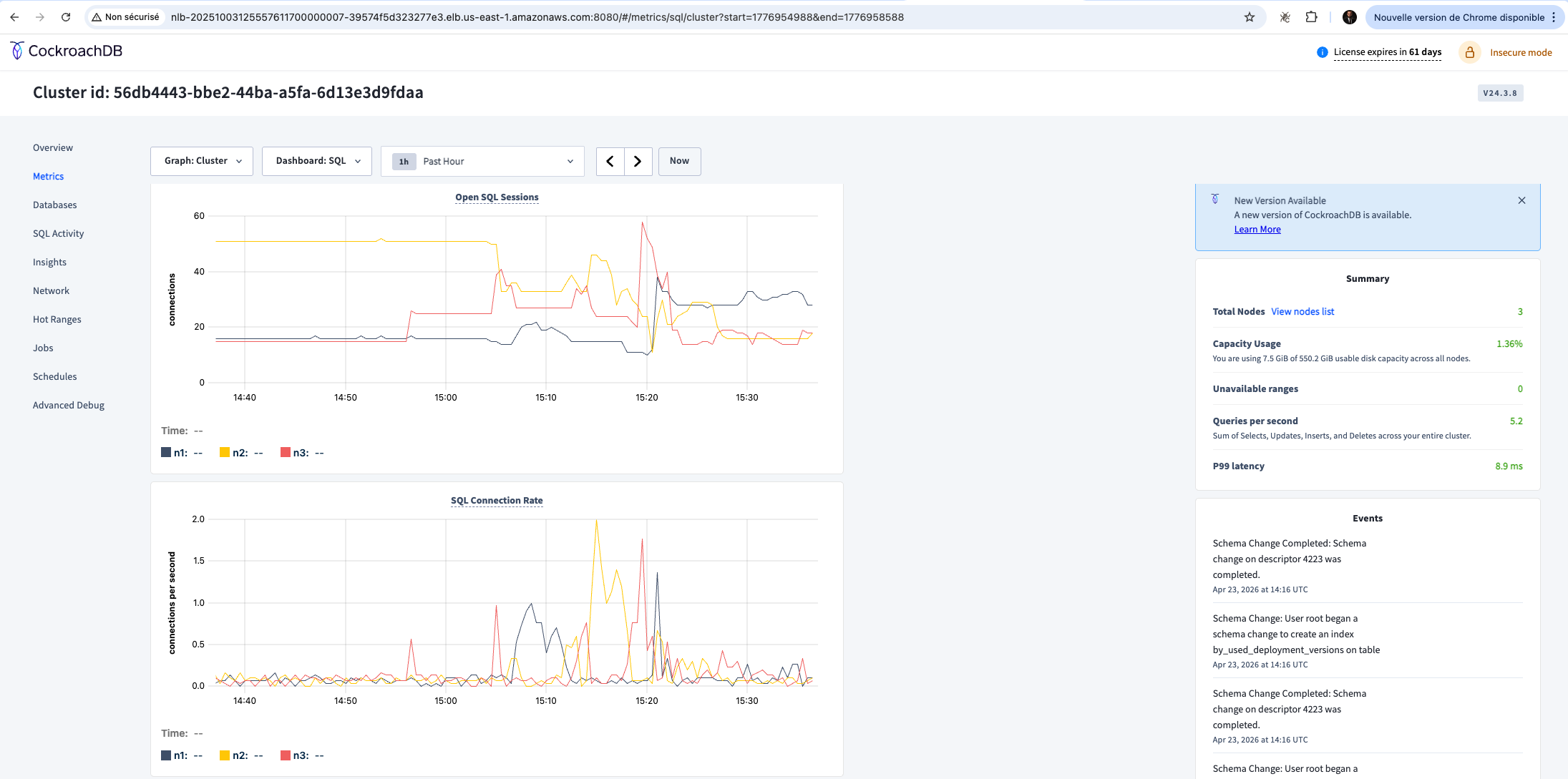
CockroachDB Admin Console (v24.3.8): SQL metrics dashboard showing open sessions and connection rate across the 3-node cluster during the Temporal benchmark. Summary panel shows 5.2 QPS and p99 latency of 8.9 ms.
Scaling in Production
As load increases, a few practices help maintain performance:
- Tune Temporal shard counts:
numHistoryShardsinbase.yamlcontrols write parallelism. Increasing it distributes history writes across more CockroachDB ranges, reducing contention. Start at 4 for development and scale to 512 or higher for production workloads. - Monitor for hot ranges: use the CockroachDB Admin Console’s Hot Ranges page to identify ranges that receive a disproportionate share of writes. Hot ranges typically appear when a small number of Temporal history shards map to the same CockroachDB range.
- Leverage range splitting and distribution: CockroachDB automatically splits and rebalances ranges as data grows, but you can pre-split the
executionsandexecutions_visibilitytables for predictable write distribution at high shard counts. - Consider a dedicated visibility backend for heavy query workloads: Temporal’s visibility store handles all
ListWorkflowExecutionsqueries. Under heavy analytical query load, routing visibility to a separate CockroachDB database (or an Elasticsearch cluster), isolates query pressure from the history write path.
These practices mirror approaches used successfully with other horizontally scalable databases, and they apply directly to CockroachDB without any Temporal-specific changes beyond configuration.
Important Disclaimer
CockroachDB is not an officially supported backend for Temporal. The pattern described in this post is validated through hands-on testing and addresses real architectural needs (global distribution, zero-downtime operations, and multi-region durability) but falls outside Temporal’s official support matrix. Before adopting this architecture in a production environment, consult with the relevant technical teams at both CockroachDB and Temporal to understand the implications for your specific workload.
Additionally, it is strongly recommended to load test the setup with production-representative workflows before promoting it to production. Use tools such as Omes (Temporal’s official benchmarking tool) to drive realistic concurrency and volume against your CockroachDB cluster, and validate that the setup meets your latency, throughput, and reliability requirements before any customer-facing traffic runs through it.